
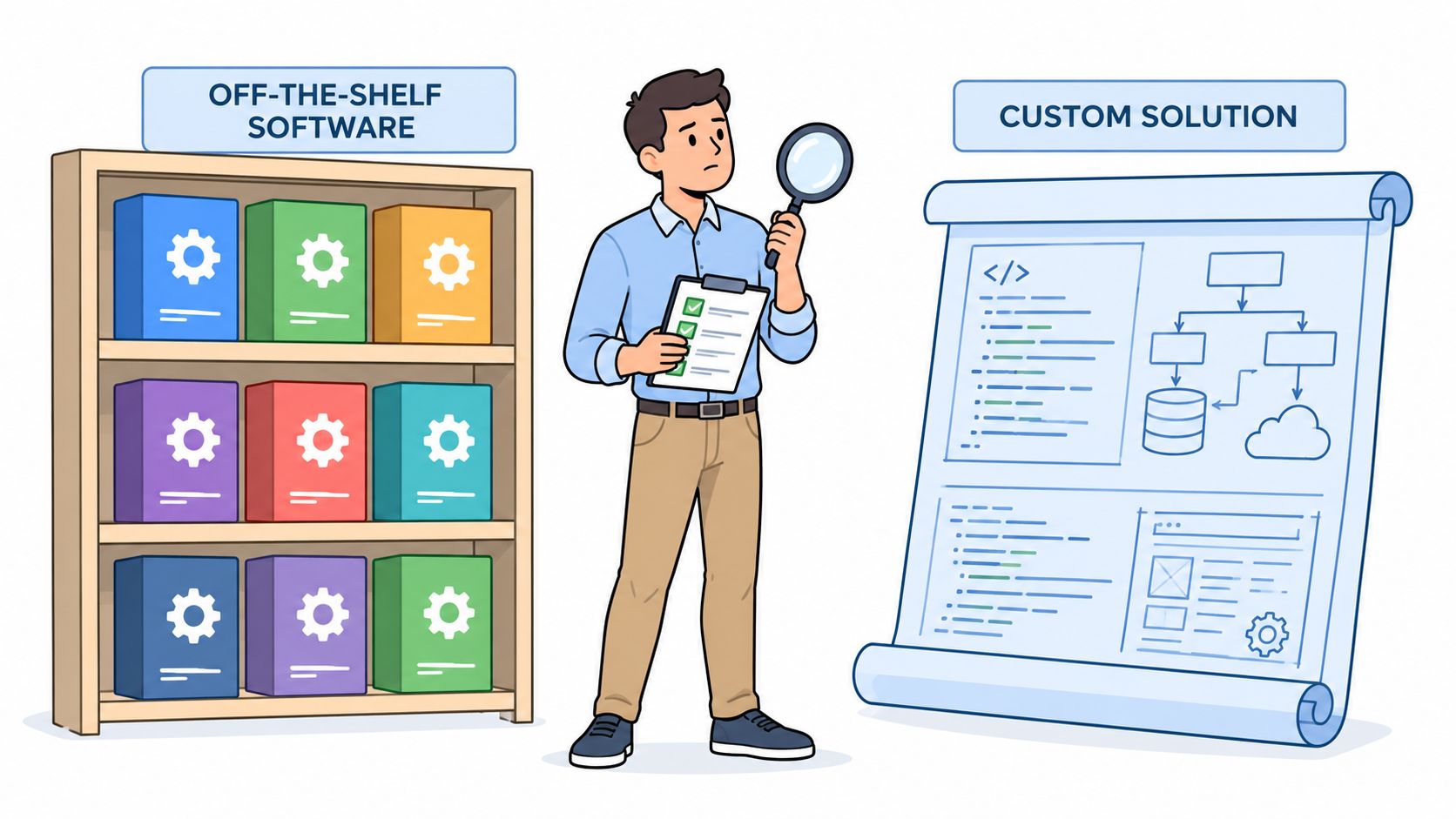
A practice manager is comparing two platforms right now. One promises a ready-made workflow for scheduling, billing, staff coordination, or recruiting. The other option is a custom build that would fit the practice more closely, but would require a development team, testing, maintenance, and a longer path to launch. The packaged product looks cheaper until migration, configuration, training, integrations, support, and future work enter the conversation.
Software off the shelf, also called commercial off-the-shelf software or COTS, is often the right choice for a medical practice when the workflow is standard, the integrations are strong, and the organization can operate within the vendor's product boundaries. It's the wrong choice when a practice must force a complex workflow into a rigid system or accept unclear answers about security, data export, and support.
COTS can deliver proven functionality without asking your practice to fund an entire product from the ground up. It can also create a hidden implementation tax that changes the economics after purchase. This guide explains what the model means, why buy-first became standard, how it compares with custom development, how to evaluate lifecycle and security risk, and how to identify the costs that sales proposals often leave outside the headline price.
Commercial off-the-shelf software is pre-built software sold to many customers through standardized licensing or subscription terms. The vendor has already developed, tested, hosted, and documented the application for a broad market. COTS can mean anything from a mass-market cloud subscription to an enterprise suite used by large organizations.
A clinic comparing employee records and scheduling platforms may choose between licensing an existing product and commissioning software around its internal process. The packaged option has already been deployed for other buyers, with the vendor responsible for maintenance. A custom build can fit the practice more closely, but the practice must fund discovery, design, development, testing, security work, deployment, and ongoing support.
The term describes the operating relationship, not only the packaging. It usually includes:
A custom build reverses that allocation. Developers create the application around your practice's rules, data model, interfaces, and user experience. You may control the roadmap, but you also assume responsibility for defects, maintenance, security updates, hosting decisions, and technical continuity.
COTS products still require configuration before they support daily operations. A practice may need to define appointment types, user roles, approval paths, templates, notification rules, billing permissions, and reporting fields. It may also need to migrate historical data and connect the application to systems staff already use.
The fit becomes clearer when remote healthcare staff need different access. A virtual medical receptionist may need a narrow scheduling role, while a patient coordinator may require referral status and follow-up queues. A billing support specialist may need different permissions from an insurance verification specialist. The product supports these distinctions only when its configuration model and integrations can handle them without excessive workarounds.
The purchase price does not reveal that implementation tax. Configuration, migration, integration work, training, and exceptions can expand the project after the contract is signed. Buyers should assess those demands before treating a standard product as a fixed-cost shortcut.
Practical rule: Treat “out of the box” as a starting condition, not a completed implementation.
Before signing, ask the vendor to demonstrate your actual workflow with representative users, records, permissions, and exceptions. A polished sales demo shows that the product can complete a happy-path task. It does not show whether your practice can run the system without costly workarounds.
The buy-first approach gained formal support in U.S. federal procurement during the 1990s. The 18F guidance on commercial software solutions explains that the Federal Acquisition Streamlining Act of 1994 and the Clinger-Cohen Act of 1996 pushed agencies to use commercial items to the maximum extent practicable.
That shift moved procurement away from assuming that every important system should be built specifically for one agency. A COTS product meant software sold to government in the same form it was sold to other customers. The policy framework later supported broad adoption of standardized products across the public sector and influenced state and local government buying.
The scale became substantial. The U.S. government spent more than $6 billion annually on software across more than 42,000 transactions in 2016, and spending later reached about $9.1 billion in 2019, as reported in the government technology analysis of commercial software and open source. The same source cites an independent historical estimate that the federal government could have saved $345 billion over 25 years by selecting commercial off-the-shelf IT solutions instead of building systems from scratch.
Those figures don't prove that COTS is automatically cheaper for every buyer. They show why policymakers and large organizations considered the model strategically useful. Vendors spread development costs across many customers, buyers avoid repeating basic engineering work, and procurement teams can evaluate a product that already exists rather than funding an uncertain build.
The same logic reached enterprise IT and then smaller organizations. Cloud delivery reduced the need for a practice to purchase and maintain its own infrastructure. Subscription access made packaged tools easier to start, while product comparisons, demonstrations, customer references, and standardized implementation services reduced the perceived risk of buying.
Medical practices now commonly evaluate packaged systems for scheduling, payroll, accounting, human resources, communications, patient engagement, and administrative coordination. A practice that hires remote staff may also use tools for time tracking, task management, document exchange, and access control.
The tradeoff is less visible. A practice may gain speed while losing control over product priorities, pricing changes, data structures, and retirement decisions. The default saves effort only when the product remains close to the practice's actual needs.
COTS and custom software allocate risk differently. Packaged software places more responsibility on the vendor for the core product, but gives your practice less control over the roadmap and underlying architecture. Custom software gives you more control over workflow design and ownership decisions, but your organization must fund and govern the engineering lifecycle.
The usual sales argument focuses on faster deployment and lower initial expense. Those advantages can be real, but they don't include every cost. Configuration, migration, training, change management, internal administration, downtime, and weak adoption can create a material implementation burden. A product that requires extensive modifications may also lose the upgradeability that made it attractive.
| Dimension | COTS Software | Custom Built |
|---|---|---|
| Initial commitment | Usually faster to procure and begin configuring | Requires discovery, design, development, and testing |
| Workflow fit | Works best when your process is common and configurable | Can mirror specialized rules and exceptions |
| Maintenance | Vendor manages the shared product, updates, and support | Your practice or development partner owns upkeep |
| Customization | Usually limited by product design and vendor policy | Controlled by your roadmap and technical decisions |
| Integration | Depends on available APIs, connectors, and vendor support | Can be designed around your existing systems |
| Data control | Governed by contract, export capability, and vendor architecture | Greater control, but your team carries more responsibility |
| Security exposure | Depends on vendor controls, patching, dependencies, and your configuration | Depends on the quality of your architecture, code, hosting, and maintenance |
| Long-term risk | Vendor lock-in, forced changes, product retirement, and renewal exposure | Technical debt, staffing dependence, defects, and maintenance cost |
A practice may buy a scheduling or workforce platform and then discover that each department uses different appointment rules, documentation standards, or escalation paths. Staff need training. Managers need new reports. Someone has to validate migrated data and monitor the integration with the existing practice management system.
Customization creates a second trap. Minor configuration may be safe, but deep modifications, custom middleware, and unsupported workarounds can make routine upgrades difficult. NASA's software engineering guidance for commercial and government software recommends trade studies and evaluation of verification, validation, supportability, update costs, license rights, source-code availability, vendor stability, and security risk before commitment.
A custom build reverses many of these limitations, but it doesn't eliminate risk. Development takes longer, requirements can expand, and the practice becomes accountable for testing, patching, access controls, backups, incident response, and technical staffing. A prototype can reduce uncertainty before development begins, and this prototyping workflow for product teams offers a useful way to test user flows before funding a larger build.
Use a documented software development life cycle for either path. COTS still needs requirements, testing, acceptance criteria, deployment planning, and post-launch review. Buying a license doesn't remove the need for disciplined implementation.
Don't choose a package because its feature list is longer. Score it against the conditions that determine whether your practice can operate, secure, and eventually replace it.
Start with the systems your staff already use. For a medical practice, that may include a practice management platform, payroll, identity provider, telephony, electronic health record, billing tools, reporting systems, and document storage. Ask the vendor to provide written answers to these questions:
A product that fits the workflow but can't exchange data reliably may create more administrative work than it removes. Disqualify a vendor that relies on vague promises such as “we can probably integrate that” without a technical scope and owner.
Ask how the vendor handles security fixes, dependency updates, maintenance windows, and customer notification. You need a clear explanation of who patches the application, how quickly critical issues are addressed, whether your practice can test changes, and what happens when an update changes a workflow.
Patchability also depends on your configuration. Heavy custom work can make the product harder to update or place your practice outside standard support. Prefer documented configuration and supported extension points over modifications that require vendor engineering for routine changes.
Request a sample export before signing. It should be usable, documented, and capable of preserving the information your practice needs for continuity. Ask whether you can export records, audit history, attachments, configuration, user data, and relationship fields, and whether exports are available during the contract and after termination.
A promise that “your data is portable” isn't enough. Require the format, timing, fees, retention period, and assistance available at exit in the contract. If the vendor refuses to explain how another system would consume the export, treat that as lock-in risk.
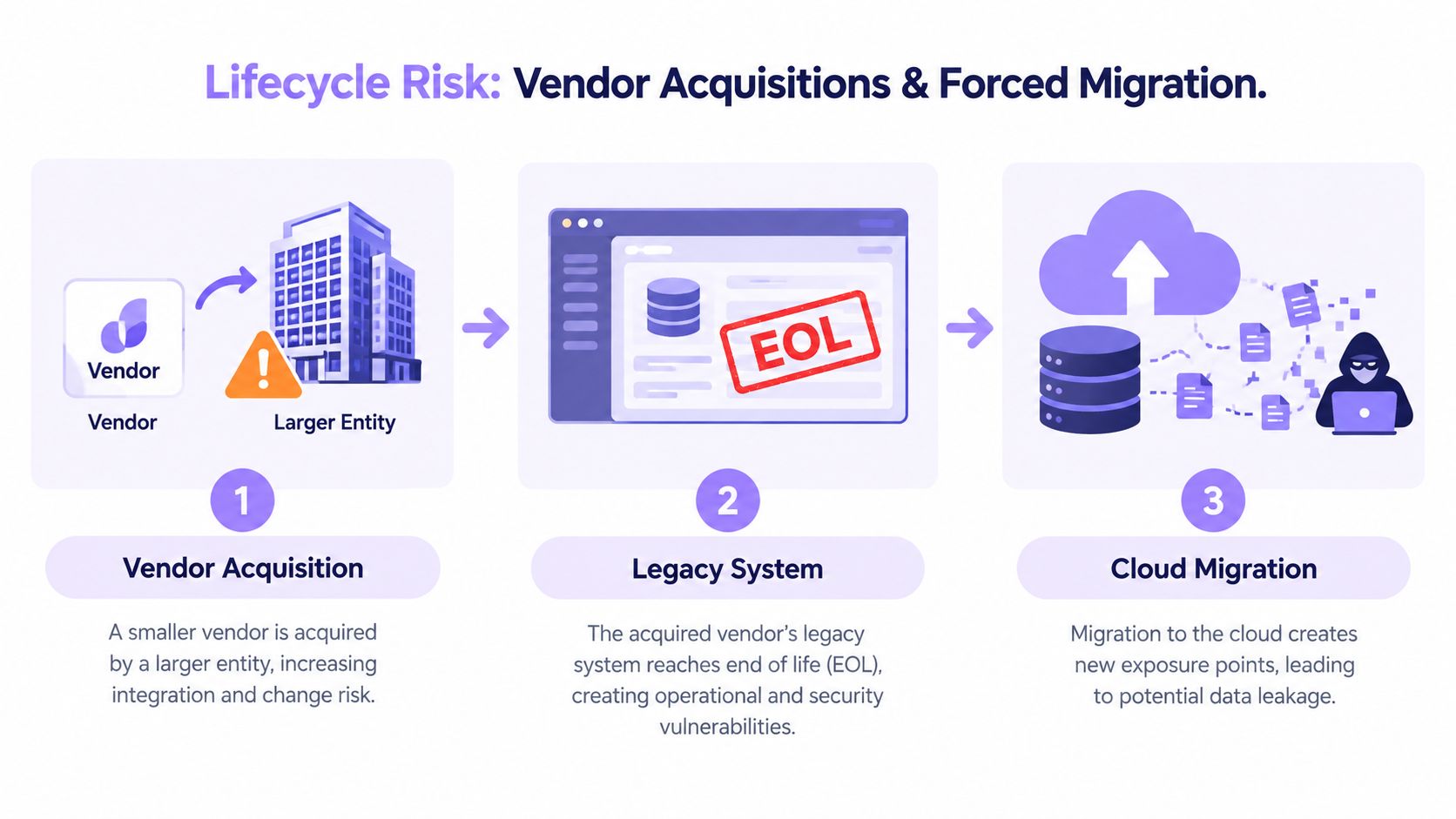
Review the vendor's end-of-life policy, upgrade cadence, service commitments, incident communications, and roadmap transparency. Ask what happens if the product is acquired, renamed, combined with another service, or discontinued. Your practice should also understand support hours, escalation paths, response commitments, and the boundary between included support and billable consulting.
Use a simple scoring worksheet with columns for requirement, evidence, risk, owner, and score. Weight patient-facing operations, access controls, clinical-adjacent administration, and revenue-cycle workflows more heavily than convenience features. Have procurement, an operational lead, an IT or security reviewer, and the staff who will use the system score the finalists independently before comparing results.
A sales demo shows possibility. A completed evaluation shows suitability.
Buying COTS moves the control point from software construction to vendor management. Your practice isn't reviewing every line of code, so it must examine the supplier's patch process, dependencies, access model, data handling, support capacity, and contractual commitments.
The DoD audit of cybersecurity risks in purchased COTS IT found that the department purchased and used commercial IT items with known cybersecurity risks. Standardization can reduce development effort, but it doesn't mean the product is secure by default.
A vendor can be acquired, change its priorities, sunset a product line, or force customers onto a replacement platform. Your practice may then face migration work, new pricing, changed permissions, new hosting arrangements, and a compressed timeline for moving sensitive data.
Security exposure also depends on patch latency. Ask how the vendor detects vulnerabilities, evaluates third-party dependencies, communicates risk, releases fixes, and helps customers identify affected versions. Your own controls still matter, including least-privilege access, strong authentication, user offboarding, device security, backup practices, and monitoring.
Contracts deserve the same attention as technical documentation. Review audit rights, breach notification, data residency, subcontractors, retention, deletion, insurance, liability, and assistance during termination. Frameworks such as SOC 2 or ISO 27001 may provide useful evidence about a vendor's controls, but they don't answer the practical question of how quickly the vendor patches a serious defect or how transparently it explains its architecture.
Medical practices should also separate HIPAA obligations from optional assurances. If an outside virtual assistant or service creates, receives, maintains, or transmits PHI for the practice, HHS treats that service as a business associate, and the practice needs a written business associate agreement that addresses HIPAA obligations.
Ask one uncomfortable question before approval: What is the plan if this vendor disappears in eighteen months? The answer should include accessible exports, documented integrations, backups, replacement candidates, internal ownership, and a realistic transition process. For broader operational discipline, review these vendor management best practices.
A mid-sized practice shouldn't build its own software for a workflow that already matches a mature commercial product. Standard payroll, ordinary employee records, routine appointment reminders, basic task management, and common administrative reporting are usually stronger candidates for COTS than for bespoke development.
Consider a practice that uses a dominant payroll provider and wants a workforce platform that connects through supported integrations. If the practice can configure roles, approval paths, reports, and notifications without changing the product's code, the packaged option may deliver a sensible balance of speed and control.
Remote staffing makes this assessment more concrete. A virtual receptionist may need a scheduling queue, call scripts, escalation rules, and limited access to patient information. A patient coordinator may need referral follow-up and appointment workflows. An insurance verification specialist may need payer documentation and task tracking. These roles don't need software that invents clinical decisions, and administrative staff shouldn't diagnose patients, provide clinical care, or perform licensed work outside the permissions and requirements that apply to the role and jurisdiction.
Pause when the workflow is unusually complex or when the software would become part of your competitive advantage. A specialty practice with intricate referral rules, highly specific authorization steps, or unusual documentation requirements may spend more time maintaining workarounds than operating a closer-fit system.
Regulated data also requires careful review. A vendor's hosting location, subcontractors, access model, retention terms, and contractual commitments may not fit your practice's obligations. HIPAA-covered providers aren't required to educate patients about telehealth privacy and security risks, although HHS explains that providers may choose to discuss those risks and ways to reduce them.
| Situation | Better starting point | Main concern |
|---|---|---|
| Common administrative workflow | COTS | Confirm integrations and permissions |
| Fast deployment needed | COTS | Avoid skipping migration and user testing |
| Workflow differs sharply from standard practice | Custom or hybrid | Price maintenance and ownership |
| Data residency or contract controls are strict | COTS only after review, or custom | Verify hosting, access, export, and liability |
| Process creates meaningful differentiation | Custom or hybrid | Protect the workflow and roadmap |
| COTS scores high on integration and needs little customization | COTS | Document exit terms before signing |
Your decision shortcut is straightforward. If the selection worksheet shows high integration fit, practical data portability, a credible support horizon, and low customization dependence, packaged software is likely the sounder choice. If those conditions aren't present, evaluate a custom component or hybrid architecture before committing your practice to a difficult migration.
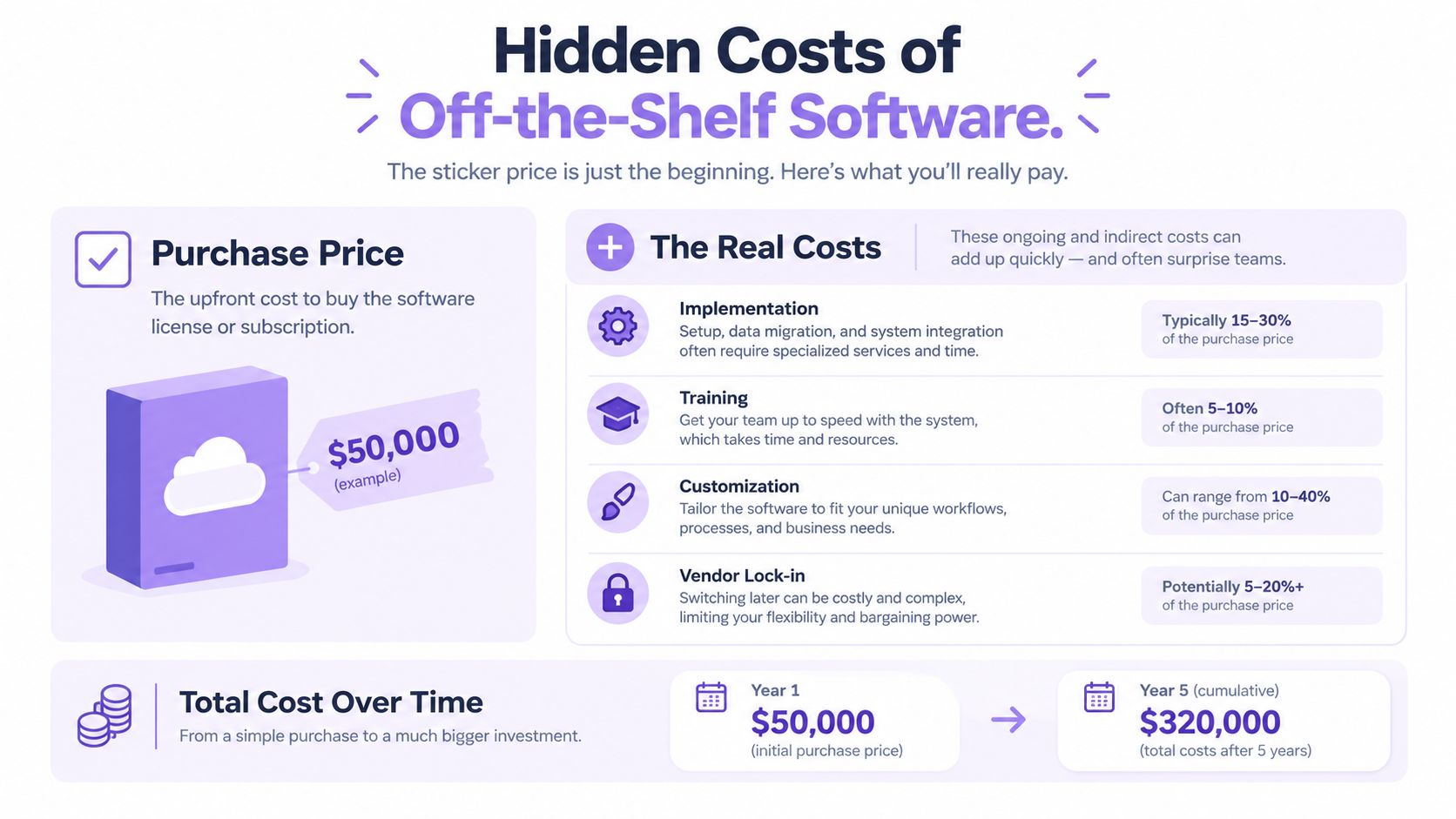
A COTS purchase can easily double in cost after signing. Configuration workshops, data cleanup, migration mapping, integration consulting, training, change management, internal administration, downtime planning, and post-launch support all add to the implementation bill. Low adoption creates another expense when staff keep using spreadsheets, inboxes, or duplicate systems instead of the application you purchased.
Separate license economics from implementation economics. A subscription may look manageable until the vendor charges for additional users, advanced permissions, reporting, sandbox environments, premium integrations, training seats, or higher service tiers. Renewal pricing may change, while leaving becomes more expensive as your records and workflows depend on the product.
Request a three-year projection, then add the operational work your practice will carry internally. Include implementation services, migration at launch, migration at exit, integration work, role-based training, testing time, temporary productivity loss, support, and user-access administration.
Reject a single bundled implementation figure. Request itemized assumptions and assign each activity to the vendor, your practice, or a third-party consultant. Practical cloud TCO advice offers a useful way to broaden the calculation beyond the subscription line.
Illustrative models often show a $50,000 Year 1 cost and $320,000 Year 5 cumulative cost. Treat those figures as a cost pattern, not a benchmark. Build your own model from written quotes and internal labor estimates.
Before approval, require these items:
For a small or mid-sized practice, the decision rule is direct. Approve COTS only when the three-year cost, implementation ownership, security controls, adoption plan, and exit path are visible in writing. If any of those remain vague, stop the purchase and resolve the gap before signing.
Software off the shelf is a practical choice when your medical practice has a common workflow, reliable integrations, manageable configuration needs, and a vendor that can explain patching, support, contracts, and data portability. It becomes dangerous when “ready-made” hides migration work, unsupported customization, weak adoption, or dependence on a vendor you can't realistically replace.
Score finalists against integration fit, patchability, data portability, and support horizon. Then calculate the full lifecycle cost, assign implementation ownership, and test the workflows your remote staff will perform. If you need help evaluating administrative staffing alongside the software that supports it, Medical Virtual Assistants can connect U.S. medical practices with pre-vetted LATAM healthcare professionals, including bilingual administrative talent aligned with U.S. working hours. Start with the roles and workflows you need, then compare candidates before you commit.