
If you're running a medical practice right now, benefits compliance probably doesn't feel like one topic. It feels like several disconnected problems happening at once. Payroll is asking who counts as full-time. Your broker is talking about plan documents. A remote patient coordinator needs system access. Someone mentions ACA reporting, someone else mentions HIPAA, and your international contractor model raises a separate set of questions.
A practical benefits compliance checklist pulls those moving parts into one operating system. For a U.S. medical practice, compliant benefits administration starts with the basics: classify your workforce correctly, determine whether you're an Applicable Large Employer, maintain required ERISA plan documents and a Summary Plan Description, handle filings and notices on time, and protect any benefits-related protected health information that staff or vendors touch. If your team spans states or countries, the checklist also has to extend beyond U.S.-only assumptions.
That matters because medical practices rarely have the luxury of a clean, centralized HR environment. You may have front-desk staff on site, billers working remotely, outsourced insurance verification, and administrative support in another jurisdiction. A checklist that only covers annual forms won't hold up in that environment.
For practice owners and managers, the goal isn't to memorize every rule. It's to build a repeatable process with clear owners, reliable vendor handoffs, and documentation that stands up when you audit it. If you're reviewing local plan options alongside staffing changes, this overview of employee benefits for Washington employers is a useful example of how benefits decisions often intersect with state-specific employer considerations.
A benefits compliance checklist is only useful if it reflects how your practice hires, pays, and manages people. In medical groups, that usually means one checklist has to serve several realities at once: W-2 employees, part-time staff, remote administrative workers, and sometimes cross-border contractors supporting non-clinical workflows.
In operational terms, a workable checklist answers five questions:
For medical practices, this isn't just an HR file issue. Benefits touch recruiting, payroll setup, patient-facing staff permissions, leave handling, and privacy controls.
A checklist works when it reduces guesswork. It fails when it becomes a static document no one owns.
A small clinic hiring a virtual medical receptionist may not have the same obligations as a larger specialty group adding several full-time remote coordinators. But both practices still need the same discipline: accurate classification, clean documentation, and clear ownership.
The biggest mistake I see is treating compliance as a once-a-year filing task. In practice, benefits compliance works better as an operating rhythm. Classification happens before hire. Documents are maintained during plan administration. HIPAA-related access decisions happen before a remote worker logs in. Vendor accountability has to be checked before a deadline arrives.
A practice adds two remote care coordinators, keeps a U.S. biller on a variable schedule, and contracts with a LATAM insurance verification specialist through an outside provider. On paper, those hires can look similar. In operations, they trigger very different benefit, payroll, and privacy obligations.
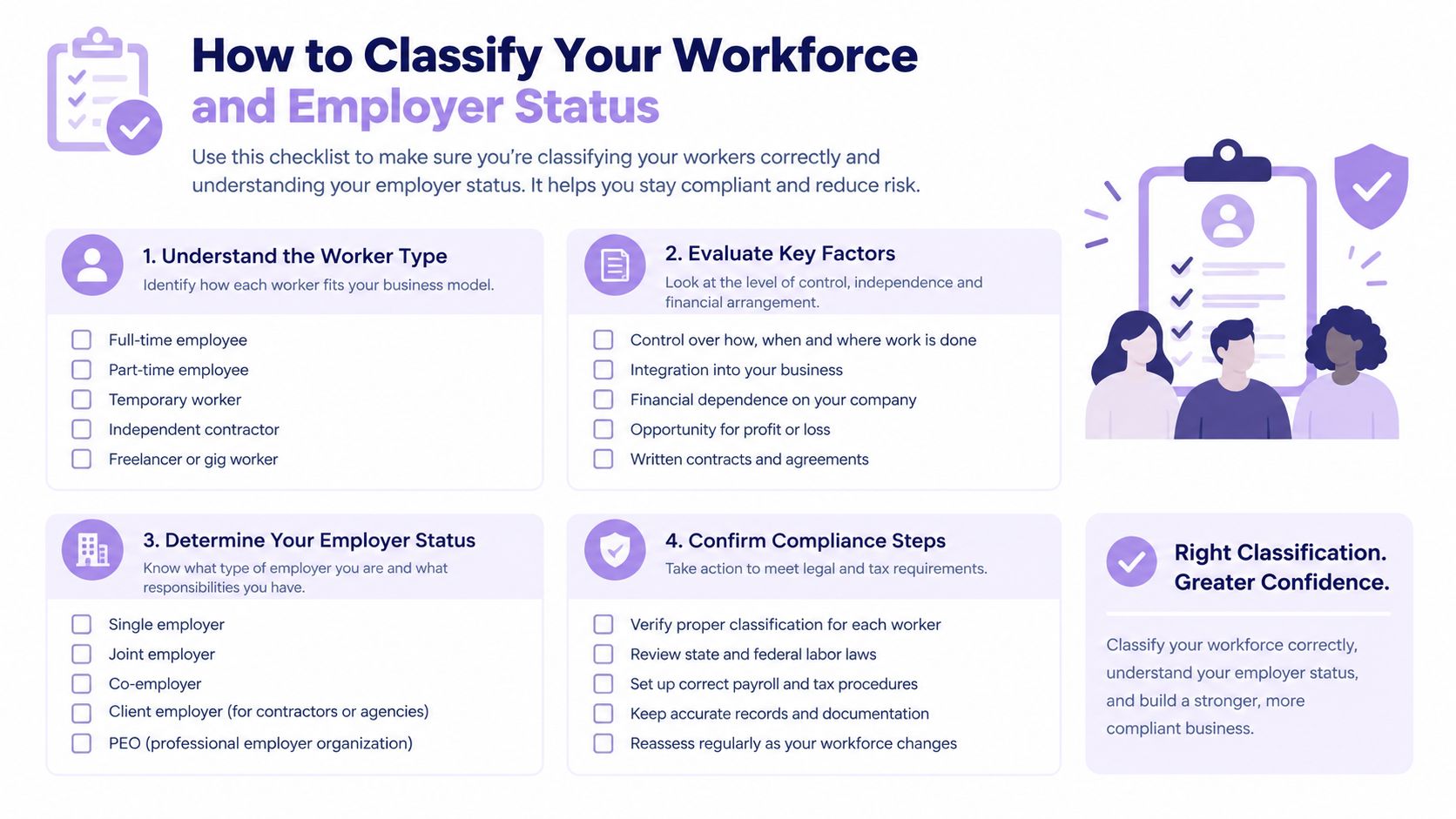
Classification is the control point. If the role is set up incorrectly at hire, the errors spread into eligibility tracking, ACA measurement, payroll tax handling, vendor contracts, and access to benefits or patient-linked information.
Titles do not decide status. Daily supervision, system access, schedule control, training requirements, and whether the work is part of your ordinary practice operations matter more.
That distinction shows up quickly in medical groups with remote support. A physician consultant engaged for a defined project usually belongs in a different review path than a remote scheduler who works inside your workflow every day, uses your scripts, and reports to your office manager. If the person functions like staff, treat classification as a legal and operational question before onboarding starts, not after the first payroll run.
Cross-border staffing adds another layer. Some practices contract directly with individuals in LATAM. Others hire through an employer of record, local entity, staffing firm, or agency model. Each structure changes who employs the worker, who handles local payroll and statutory benefits, and whether the worker should be counted in U.S. benefit administration. A checklist that only asks employee or contractor misses the point. It also needs to ask which entity employs the person, which country's labor rules apply, and who holds the documentation.
Employer status under the ACA should be reviewed from actual headcount and hours, especially after growth, acquisitions, or a shift to more remote administrative staffing. The IRS explains the Applicable Large Employer rules and how full-time employees and full-time equivalents are counted in its ACA information for Applicable Large Employers.
In practice, I do not wait for year-end to check this. A multi-location practice can cross the threshold, especially when related entities share ownership or management. If your group uses a management company structure, affiliated practices, or an MSO, review controlled-group and aggregation questions with counsel or your benefits advisor early. That decision affects reporting, offer-of-coverage obligations, and how you build your measurement process.
Practices often mix up two different questions. One is whether a worker counts as full-time for ACA purposes. The other is whether the plan document makes that worker eligible for benefits. Those answers often overlap, but they are not the same.
Variable-hour staff make this harder. So do remote teams with changing schedules, float staff who support several locations, and workers paid through different entities. If payroll coding, time records, and HRIS setup do not match, the practice can miss an offer, make one late, or fail to support the decision later. The IRS affordability rules and safe harbors also depend on clean payroll data, not assumptions made by a broker after the fact.
Good classification decisions rarely happen in one email thread. They happen in a repeatable review that ties operations, payroll, benefits, and privacy together.
A practical workflow looks like this:
Define the role before recruiting starts
Identify the work pattern, reporting line, expected hours, country or state of work, and whether the role touches benefit administration or patient-linked data.
Match the role to the engagement model
Choose employee, contractor, agency worker, employer-of-record hire, or another structure based on how the work will be performed.
Confirm the employing entity and payroll path
Document who pays the worker, which tax or local labor rules apply, and whether the worker belongs in U.S. ACA tracking.
Check benefit impact before the start date
Review waiting periods, measurement method, affordability setup, and whether the role should appear in benefits eligibility files.
Document privacy and vendor access
If outside parties handle enrollment, claims support, or benefits data, record who can access what, under which agreement, and with what restrictions.
One more point matters. Revisit classification when the role changes. A contractor who starts with a limited project can turn into a de facto employee once the practice sets hours, assigns recurring operational work, and gives broad system access. Remote arrangements drift over time. Your checklist should catch that before it becomes a benefits and payroll cleanup project.
A benefits file usually looks complete right up until an employee asks for an SPD, the carrier changes, or ACA reporting pulls a different eligibility list than payroll. In medical practices, that gap often shows up after growth. A new provider joins, a remote scheduler is added in another state, or a LATAM support hire sits outside the U.S. benefits population but still appears in operating reports. If your document control is weak, deadlines start to slip because no one is working from the same source of truth.
The practical fix is a controlled inventory. List what must be maintained, what must be distributed, what must be filed, and which workers belong in each process. For practices using remote and cross-border staffing models, that last point matters more than many generic checklists admit. U.S. plan documents, ACA reporting, and ERISA disclosures may apply to one group of workers, while payroll records, local labor documents, or employer-of-record files apply to another.
For ERISA-covered plans, the two baseline items are the plan document and the Summary Plan Description. The Department of Labor explains in its health benefits compliance guide that participants in ERISA-covered health plans have disclosure rights, and those rights depend on the plan administrator having the right materials in usable form.
Carrier booklets do not always solve this. I regularly see practices assume the insurance certificate, renewal summary, and enrollment kit add up to a complete ERISA file. They often do not, especially after a broker change, a payroll migration, or the addition of separate dental, vision, FSA, HRA, or COBRA administration vendors.
Drafting quality matters too. An SPD is supposed to explain benefits and participant rights clearly enough for an average employee to understand. The EisnerAmper overview of SPD compliance standards is a useful reminder that a dense legal packet can still create compliance risk if employees cannot tell what the plan covers, when coverage starts, or how to file a claim or appeal.
| Document or Filing | Who It Applies To | Timing and Trigger |
|---|---|---|
| Summary Plan Description | Participants in an ERISA-covered health plan | Provide within the required disclosure window after coverage begins and update when the plan changes materially |
| Plan document | ERISA-covered plans | Keep a current signed version that matches actual plan terms, vendors, and operations |
| Summary of Material Modifications | ERISA-covered plans with material changes | Distribute when plan terms change and track the date, audience, and method of delivery |
| Form 5500 | Plans subject to annual filing rules | Review annually for filing status, participant counts, and whether an audit requirement has been triggered |
| Forms 1094-C and 1095-C | Applicable Large Employers | File annually based on ALE status and retain support for full-time status, offers of coverage, and affordability coding |
Deadlines fail in ordinary ways. Someone assumes the broker handled distribution. Payroll exports a benefits eligibility file with the wrong waiting period logic. A remote U.S. employee is left off the enrollment roster after a state registration delay. A LATAM hire is counted in workforce planning but should not be counted in a U.S. benefits filing population. None of that is unusual. It is operations work, and it needs named owners.
Use three responsibility buckets and assign an owner to each one.
Maintain
Keep current plan documents, SPDs, amendments, and vendor agreements in one controlled location. Record the effective date, plan year, carrier or TPA, and the person responsible for review.
Distribute
Track employee-facing notices by event and audience. New hire eligibility, annual enrollment, qualifying events, and material plan changes should all leave a dated record.
File
Assign annual filings to a specific internal owner, even if outside parties prepare them. That owner should reconcile payroll, HRIS, and benefits eligibility data before anything is submitted.
This is also where medical practices with remote teams need to be more precise than the average employer. The same employee roster should not drive every compliance workflow. Your U.S. ACA filing population, ERISA participant list, state payroll registrations, and non-U.S. hiring records may overlap, but they are not identical. A good control is to maintain a worker-jurisdiction matrix tied to payroll status, benefits eligibility, and document obligations. Practices tightening those handoffs often pair this section with a broader payroll compliance checklist for multi-jurisdiction hiring.
Your filing calendar should confirm decisions already made correctly, not expose classification, payroll, or eligibility errors after the fact.
Several patterns come up repeatedly.
Broker reliance without document control
The broker may draft or send materials, but the practice still needs proof of what was issued, when it went out, and which version governs.
Growth without cleanup
Provider additions, acquisitions, and new locations often change eligibility and participant counts before the benefits file is updated.
Remote onboarding drift
Administrative staff working from another state can be active in payroll and operations before notices, waiting periods, and enrollment records are handled correctly.
Split systems
Payroll, HR, and benefits administration each hold part of the record. If no one reconciles them, Form 5500 and ACA reporting become cleanup exercises.
If you fix one control in this section, build a single document register. It should show each required document or filing, the governing plan year, where the record lives, who owns it, the last review date, the next due date, and the event that triggers an update. That register is what keeps ACA, ERISA, vendor coordination, and jurisdiction-specific payroll rules from drifting apart as your practice grows.
A remote benefits question in a medical practice often starts small. An HR coordinator needs help with open enrollment. A billing support contractor needs limited access to eligibility data. A virtual assistant in another state helps employees resolve carrier issues. Within a week, the practice has exposed PHI, plan data, or both across systems that were never reviewed together.
For practices that use remote U.S. staff and LATAM support teams, HIPAA cannot sit in a separate privacy binder while benefits access is handled by HR, payroll, the broker, and the TPA. The control point is the workflow. Who can view enrollment records, claims-related information, dependent data, or employee medical questions. Which vendor stores that data. Which country or state the worker sits in. How access is approved, logged, and shut off.
Under HIPAA, a business associate is a person or organization that performs certain functions or services for a covered entity involving protected health information, as explained in the Department of Labor health benefits compliance guide.
That matters in everyday staffing decisions. A remote scheduler following a narrow script may never touch PHI beyond what your practice already permits through standard operations. A remote insurance verification specialist, leave administrator, or benefits support vendor usually presents more exposure because the role can involve claims details, member IDs, dependent information, or employee health plan inquiries.
Titles are not the control. Data access is.
I have seen practices classify a role as "admin support" and skip the privacy review, even though that person could open shared inboxes, carrier portals, and benefits tickets. The problem is not the job title. The problem is giving system access before anyone maps what information the role can see.
If your group health plan or related vendor arrangement involves PHI, the checklist should require legal and operational review before access goes live. The HHS HIPAA guidance for business associates is a better source to anchor that review than a repeat citation to the same employer PDF.
In practice, that review should answer five questions:
What exact systems will the person or vendor access
Name the carrier portal, HRIS, ticketing queue, shared drive, email box, or spreadsheet.
What data elements are visible in each system
Separate demographic data, enrollment data, claims-related information, and employee medical communications.
Is a Business Associate Agreement required
Confirm it before credentials are issued, not after onboarding.
Which jurisdiction-specific rules affect the arrangement
A remote worker in California, Texas, Colombia, or Mexico may trigger different payroll, confidentiality, and documentation steps even if HIPAA remains the federal privacy baseline.
Who owns offboarding
Someone inside the practice must remove access across benefits, payroll, carrier, and communication systems on the same day the role ends.
Medical practices get exposed operationally. The broker may own enrollment support. The TPA may own plan administration. IT may own credentials. Payroll may own worker setup for a remote employee in another state. If no one owns the full access map, HIPAA and benefits compliance drift apart.
HIPAA sets a legal floor. Remote operations usually need tighter controls than that floor, especially when benefits tasks are distributed across home offices, outsourced teams, and cross-border support.
Use approved communication channels, role-based permissions, documented device rules, and prompt offboarding. Require privacy review before forwarding employee benefit questions into shared inboxes or chat tools. For remote teams, these remote work security best practices are useful because they translate policy language into day-to-day operating controls.
A simple rule helps. If a remote worker can view employee benefits questions, dependent information, or patient-linked coverage details, treat the access request as a compliance workflow with documented approvals.
Breach timing matters, but speed only helps if your records are usable. HHS explains that covered entities must provide breach notification without unreasonable delay and no later than 60 days after discovery in its breach notification guidance.
That deadline exposes weak operations fast. If your practice cannot tell which vendor had access, which account was used, whether PHI was downloaded, or whether the person was an employee, contractor, or offshore support worker, the legal clock keeps running while your team reconstructs basic facts.
Build these controls into the checklist:
A system-by-system access register
Include HRIS, carrier portals, payroll, benefits administration tools, shared mailboxes, and file storage.
Named escalation contacts for each vendor
Keep current contacts for the broker, TPA, payroll provider, IT vendor, and any remote staffing partner.
An incident intake path staff will use
One email, one form, or one hotline is better than scattered reporting.
Permission reviews for remote and cross-border roles
Review what LATAM support staff and out-of-state employees can see, not just what their contract says they should see.
Documentation of training and acknowledgments
Save proof that remote workers received privacy, security, and reporting instructions tied to their actual workflow.
For medical practices, HIPAA compliance in benefits administration is not just a privacy rule. It is an operating system issue. The practices that handle it well connect plan administration, vendor contracts, remote hiring, payroll setup, and access control before the first enrollment question hits a shared inbox.
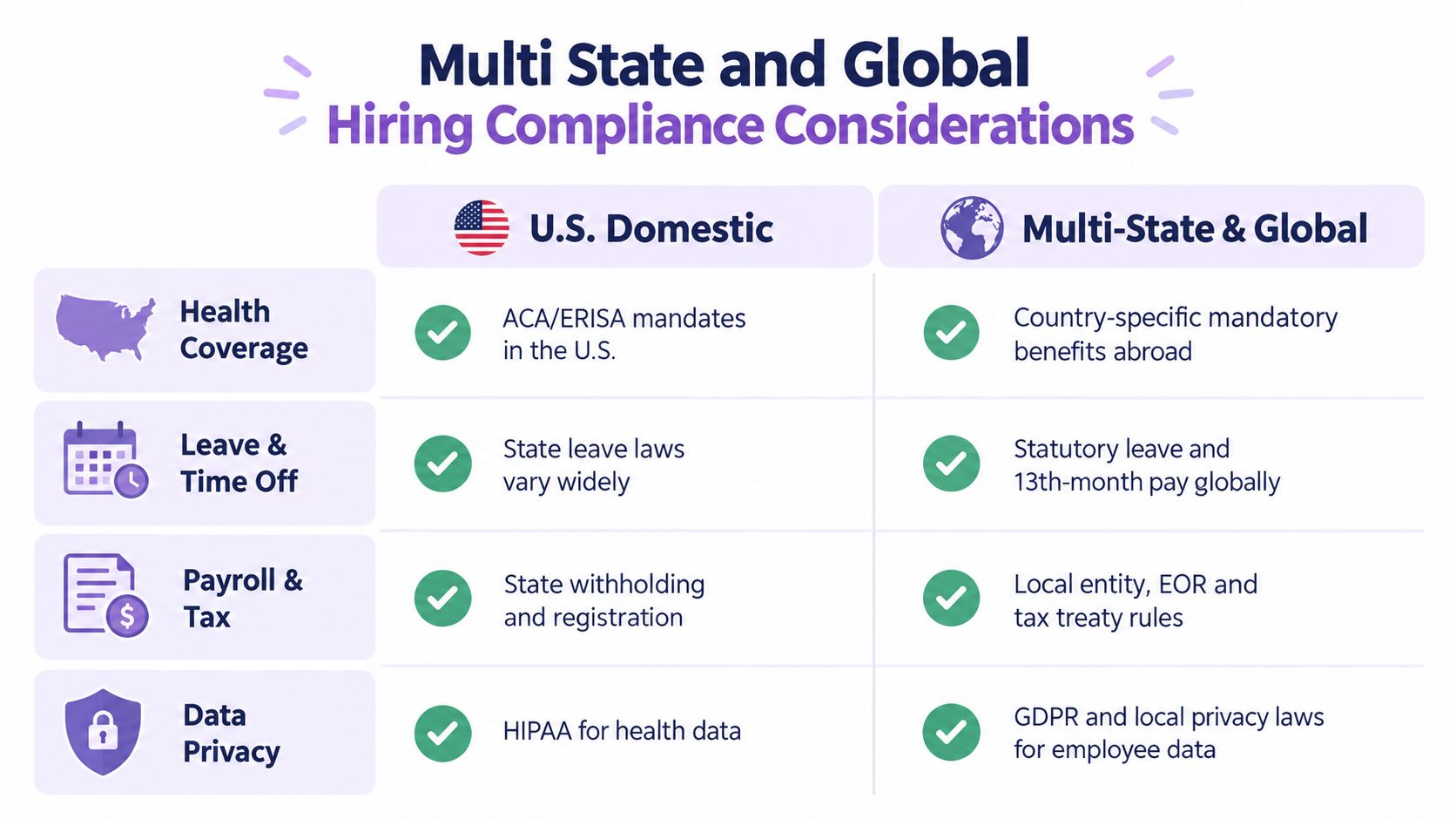
A U.S.-only checklist starts to break down once your workforce spans multiple states or countries. That doesn't mean every remote hire creates the same burden. It does mean your practice should stop assuming one domestic benefits template covers all employment models.
ACA and ERISA remain central for U.S. employees, but cross-border hiring introduces different obligations. Recent 2026 guidance in India shows why generic checklists fail: the labour-code FAQ set addresses unresolved questions on FTE gratuity, wage definition, and conflicts with state rules, while the checklist requires EPFO and ESIC registration, monthly contribution deposits, PF recalculation, maternity leave, and creche obligations, as described in this India labour-code compliance checklist for 2026.
For North American medical practices, the lesson isn't that India's rules apply to everyone. The lesson is operational. Once you hire in another jurisdiction, local payroll, leave, contribution, and documentation rules can sit entirely outside your U.S. benefits checklist.
| Hiring model | Main compliance focus | Typical operational consequence |
|---|---|---|
| U.S. single-state employee | ACA, ERISA, plan documents, notices, payroll alignment | Standardized onboarding can work if ownership is clear |
| U.S. multi-state employee | State-by-state payroll and leave overlays on top of federal requirements | Handbook, payroll setup, and notices often need revision |
| Cross-border contractor | Contract terms, local labor risk, data access limits, tax and payment structure | A contractor agreement alone may not answer local compliance questions |
| Cross-border employee or EOR model | Jurisdiction-specific payroll, benefits, statutory leave, local registrations | Local experts or provider coordination usually become necessary |
A practice manager doesn't need to become a global employment lawyer. You do need to know when your standard checklist is no longer enough.
Medical practices often focus on HIPAA first, which makes sense. But employee data and recruiting data may trigger separate privacy obligations outside the U.S. If your remote hiring model involves international worker records, identity documents, or cross-border HR systems, privacy review should happen alongside payroll and contract review.
For organizations that need a representative or process support for European privacy obligations, Article 27 compliance support is one example of the type of specialized resource that may become relevant when your workforce model expands internationally.
A global hiring checklist is less about copying foreign rules into your U.S. handbook and more about assigning local compliance review before the hire is finalized.
When a practice hires into a new state or country, I'd review four items immediately:
Payroll setup
Registration, withholding, contribution handling, and local pay practices.
Agreement model
Contractor, direct employee, or employer-of-record. Each changes your obligations.
Leave and separation language
Maternity rules, statutory leave, and severance treatment can differ sharply by jurisdiction.
Communication materials
Offer letters, onboarding instructions, and policy documents may need local adaptation.
That's the point where finance, HR, legal, and operations need to coordinate, even in a small practice.
A common failure point shows up after enrollment is finished. The carrier says transparency files are handled. Payroll assumes the broker confirmed it. No one inside the practice has checked the live posting, the file format, or whether a vendor change broke the feed.
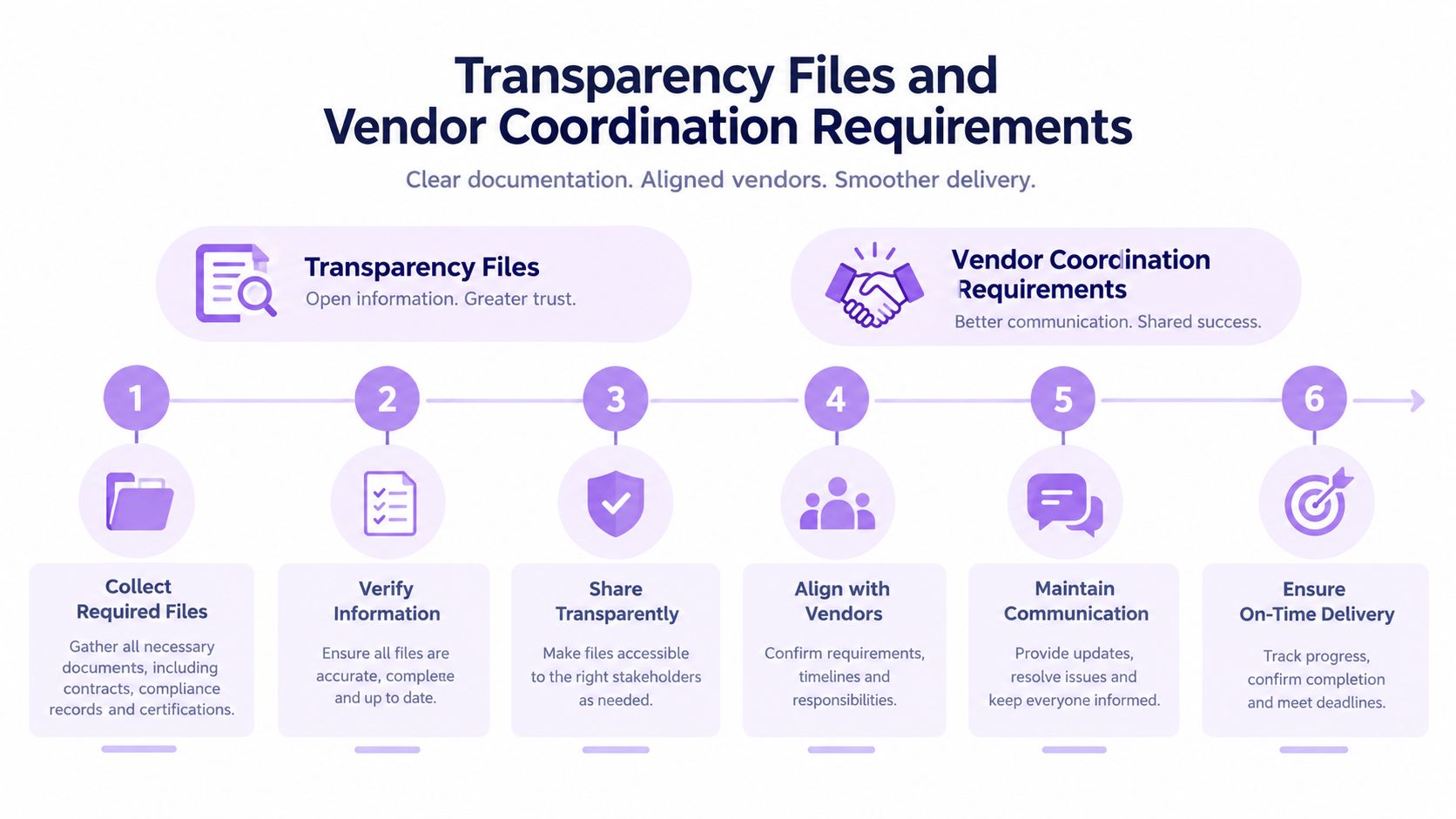
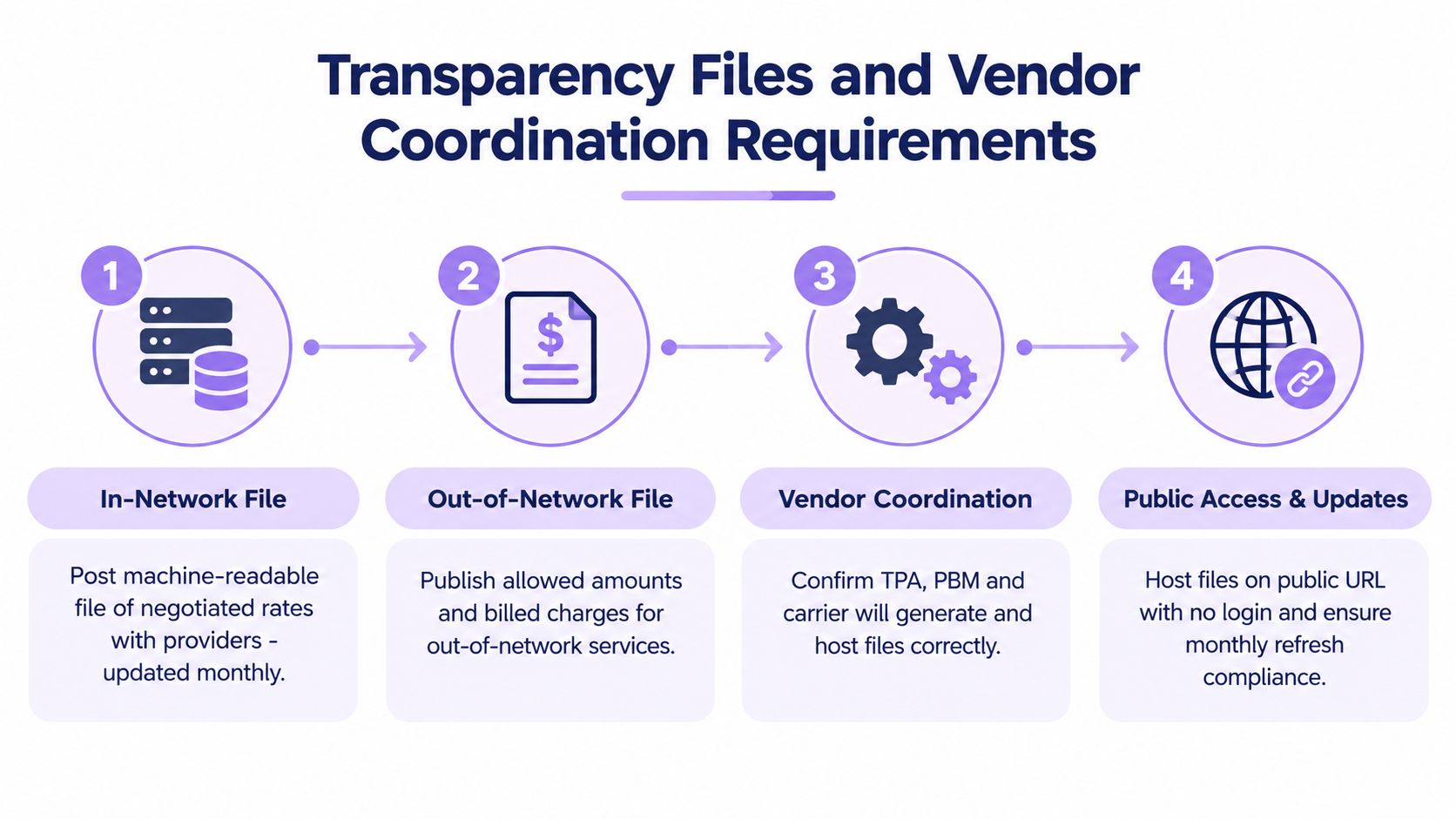
Benefits compliance now includes machine-readable transparency files, not just plan notices and annual disclosures. As noted in this employee benefits compliance checklist, employers and plan administrators need to account for public posting requirements tied to in-network rates, out-of-network allowed amounts, billed charges, and file updates.
For medical practices, that work usually crosses several systems. The health plan carrier may generate the file. A TPA may host or transmit it. Payroll and HR still need to confirm the eligibility and plan data feeding those files match what employees were offered and enrolled in.
That coordination issue gets harder when the practice uses remote staff or a mix of U.S. and LATAM support teams. The people handling deductions, onboarding records, and vendor tickets may sit in different countries, while the legal responsibility stays with the U.S. employer sponsoring the plan.
Practices often assign benefits tasks by habit instead of by control point. The practice manager handles employee questions. Finance approves invoices. The broker manages renewals. The carrier runs its own systems. That setup works until someone needs to answer three specific questions: where the files live, who verified the last update, and what happens if a vendor changes feeds or platforms.
The greater risk is not just missing a deadline. It is believing a vendor owns the process when no one has verified the actual files.
I have seen this happen after a carrier conversion and after a payroll transition. In both cases, everyone assumed the prior process carried over. It did not.
Use a short operating checklist and assign one internal owner.
Confirm written responsibility
Get the service agreement, implementation notes, or renewal paperwork that states whether the carrier, TPA, or another vendor generates and hosts the files.
Check the public posting location
Test the URL yourself. Save the link in your compliance folder. If access fails or redirects, open a ticket immediately.
Review refresh timing
Confirm how often the file is updated and who is alerted if an update fails.
Match plan and payroll inputs
Compare plan options, contribution structure, and eligibility rules against what payroll and enrollment systems are using. This matters in medical groups with part-time staff, variable-hour staff, and remote administrative hires.
Document the review
Keep a dated record of who checked the file, what was tested, and whether any discrepancy was escalated.
If your team is deciding whether this work should stay in-house or sit with an outside administrator, this guide to outsourcing employee benefits administration helps clarify ownership lines and review obligations.
Someone inside the employer has to own follow-through, even if every technical step is outsourced. In a small practice, that may be the administrator or operations lead. In a larger physician group, it may sit with HR operations, finance, or a benefits manager.
What matters is clear control over the workflow. Name the internal owner. Name the backup. Store the posting link, vendor contacts, and review log in one place. If your practice hires remotely across states or relies on LATAM support staff for HR and payroll coordination, limit who can access benefits data and separate file-checking tasks from broad system access. That protects privacy and makes audits much easier to run.
The strongest benefits compliance checklist is the one your team can run. That means moving from reference material to a calendar, an ownership model, and a short list of triggers that force review before issues spread.
Most medical practices don't need a complicated governance structure. They do need a predictable review rhythm. I recommend splitting the year into recurring checks and event-triggered checks.
Recurring checks work well on a quarterly cadence. Review workforce classification changes, active plan documents, access to benefits-related systems, and any open vendor issues. Confirm that payroll and eligibility records still match.
Event-triggered checks happen whenever you add a new state, onboard a remote employee with system access, change carriers or TPAs, alter plan terms, or restructure how administrative work is outsourced.
Compliance gets easier when every staffing or vendor change automatically triggers a short review instead of a full reinvention.
New hires and status changes
Confirm eligibility tracking, onboarding notices, and system-access approvals are complete.
Remote access review
Check whether benefits-related permissions still match actual job duties.
Vendor follow-up
Resolve any open issues with payroll, broker, TPA, or privacy contacts.
Classification review
Revisit roles that may have shifted from occasional support to recurring operational work.
Document register review
Confirm plan materials, notices, and agreements are current and centrally stored.
Data reconciliation
Compare payroll records, enrollment records, and internal headcount lists.
Employer-status confirmation
Recheck whether the practice's workforce profile changes your federal obligations.
Filing preparation
Start early enough to validate data before formal submission windows.
Vendor performance review
Ask for proof, not verbal assurance, that assigned compliance tasks were completed.
| Task | Practice manager | Provider owner or executive | Payroll or finance | Broker TPA or outside advisor |
|---|---|---|---|---|
| Workforce classification intake | Primary | Informed | Consulted | Consulted |
| Eligibility and payroll alignment | Consulted | Informed | Primary | Consulted |
| Plan document inventory | Primary | Informed | Consulted | Consulted |
| ACA and filing support | Consulted | Informed | Primary | Consulted |
| Remote access and privacy escalation | Primary | Informed | Consulted | Consulted |
| Cross-jurisdiction hiring review | Consulted | Informed | Primary | Consulted |
This kind of matrix matters because medical practices often have capable people doing the work, but no one knows who has final responsibility.
Run through these questions without overcomplicating them:
If several answers are unclear, that's your starting point.
Some issues deserve quick escalation. I'd involve counsel, a compliance specialist, or a knowledgeable benefits advisor when:
For practice leaders who are already reviewing adjacent financial controls, this specialty revenue risk checklist is helpful because compliance weaknesses often show up alongside revenue-cycle process gaps.
A staffing partner can also matter if your practice is building a remote support model and needs cleaner operational handoffs. LatHire is one example of a platform that supports international hiring workflows with HR, payroll, benefits, and compliance coordination, which can be useful when your administrative staffing model extends beyond a single U.S. location.
A solid benefits compliance checklist for a medical practice isn't a binder of deadlines. It's an operating system. It starts with workforce classification, because every other requirement depends on knowing who your workers are, how they're engaged, and which employer rules apply. From there, the checklist has to cover required documents and filings, HIPAA-aware handling of benefits-related data, and vendor accountability that holds up under review.
That's especially true for practices using remote staff, outsourced administrative support, or cross-border talent. In those settings, compliance stops being a narrow HR task and becomes shared operational work across payroll, privacy, management, and outside partners. The checklist needs to reflect that reality or it won't prevent mistakes.
The practical next step is simple. Run a focused self-audit. Assign owners for classification, filings, privacy review, and vendor verification. Build a calendar that ties compliance reviews to hiring changes, not just annual deadlines. If your practice is expanding its remote support model, make sure your staffing process and your compliance process are being designed together, not separately.
If you're building a remote administrative team for your practice and want cleaner coordination around hiring models, payroll, and compliance handoffs, it's worth reviewing vetted support options before you scale.

