
You're not probably not losing sleep over hiring documentation because it's glamorous. You're losing sleep because the wrong inbox ping arrives at the wrong time, and suddenly you're hunting through Slack, Drive, and someone's half-finished onboarding folder for proof that a person was hired correctly, paid correctly, and told the right things on day one. That's when the bill shows up.
I've seen the version where a contractor in another country says they were misclassified, the payroll team can't find the signed agreement, and the only “record” is a screenshot of a message thread with an offer letter attachment. Cute. Also useless. Hiring documentation is what keeps a messy hire from becoming a compliance headache, a tax problem, or a credibility loss with your own team.
The frustrating part is that most founders treat this stuff like admin fluff until it starts costing real time. Then everyone suddenly cares about I-9s, W-4s, signed acknowledgments, and why the “final_final” folder is not a system. The fix is not magic. It's a defensible file, built on purpose, and kept clean enough to survive an audit, a dispute, or a remote hire gone sideways.
The worst version of a bad onboarding day is always the one that looks small at first. A founder thinks they've got a simple hire, a contractor in another country, a quick start, maybe a signed offer in Slack, and then months later someone asks for the record trail and the whole thing collapses into screenshots and memory. That's not a process. That's improv.
Hiring documentation matters because it has to hold up long after onboarding feels “done.” In the U.S., I-9 records must be kept for 3 years after hire or 1 year after employment ends, whichever is later (FirstHR). Personnel-file compliance benchmarks also treat completion of required forms like I-9s, W-4s, handbook acknowledgments, and offer letters as a 100% requirement in practice, because one missing document can leave you exposed long after the person is already working.
Practical rule: If you can't prove who was hired, when they started, what they accepted, and which records you kept, you're not “organized.” You're just waiting for the wrong question.
The slow pain is what gets people. In 2026 recruiting benchmarks, the average U.S. time-to-fill was reported at 44 days, up from 33 days in 2021, a 33% increase in three years, and the global median time to hire was 38 days (Pin). Slower hiring means more handoffs, more approvals, more versions of the truth, and more opportunities for the paperwork to drift out of sync.
That's why this whole topic exists. Not because HR loves forms. Because forms are the only thing standing between a routine hire and an expensive cleanup that eats a week, annoys legal, and makes finance start using the phrase “risk exposure” with a straight face.
Hiring documentation is not a pile of PDFs in a folder with a reassuring name. It's the contemporaneous, time-stamped audit trail that proves who you hired, on what terms, with what verification, and through what decision process. If a record doesn't help you reproduce the decision later, it's decoration.
That distinction matters because memory is slippery and good intentions don't survive disputes. A good file tells the story of the hire without relying on someone to remember what happened six months ago. It shows the job was posted for a real reason, the candidate was evaluated against actual criteria, the offer matched the approval trail, and the onboarding paperwork was captured on time.
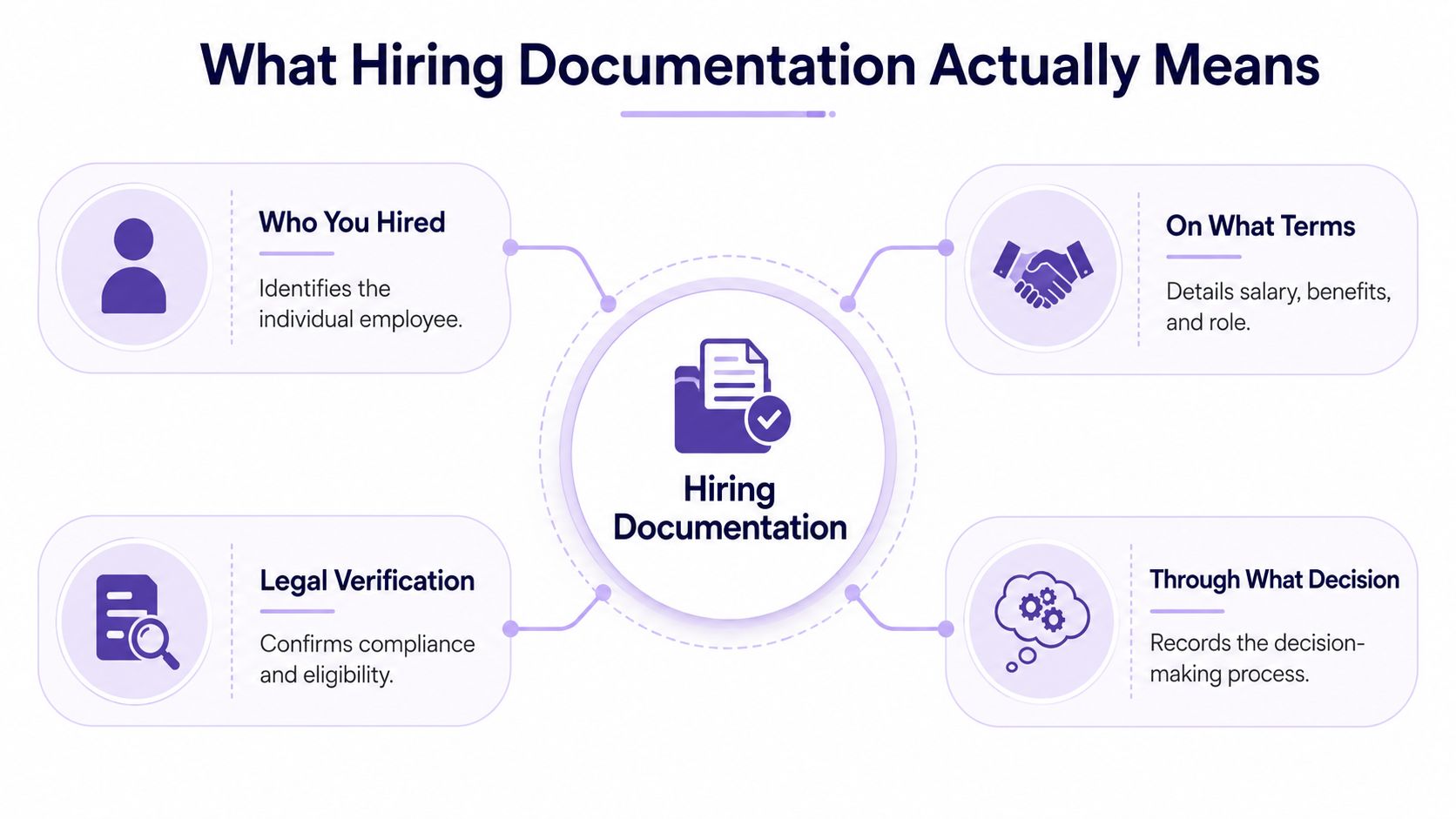
A clean file answers four questions without making anyone dig through chat logs.
That last one is where a lot of startups get sloppy. They keep the offer letter and call it a day, which is basically the documentation equivalent of saying “trust me, bro.” In a distributed team, that doesn't cut it. Cross-border hiring makes it worse, because the record has to explain location, jurisdiction, work authorization, and why the job was structured that way.
If you're using AI-assisted sourcing or screening, the file needs more than a final verdict. It needs the tool/version, input data, output, configuration, updates, and latest accuracy or fairness audit results (Skill). No one gets to say “the model picked them” and call that accountability.
A sloppy hire file is how teams end up arguing with payroll, legal, or an auditor months later. Build the record in the order the hire happened. That is the trail people will reconstruct anyway.
Start with the job requisition and the role description. Those two documents show why the hire existed, what work the person was supposed to do, and what standards you set before the search began. If the description could describe three different jobs, you have already built confusion into the file.
A solid requisition shows the business reason, reporting line, and must-have skills. A weak one reads like motivational copy with key details buried somewhere out of sight. If you want a practical benchmark for the screening side of the process, this pre-employment screening guide belongs in the toolkit.
An interview scorecard without decision criteria is just a vibes log. It records opinions, not judgment. The better version names the competencies, defines what good looks like, and captures notes against each criterion instead of loose comments about “energy” or “culture fit.”
That matters because the file should show how the team made the call, not just what the call was. If a candidate later questions the process, the scorecard needs to stand on its own.
The offer letter is where the terms become explicit. Compensation, start date, job title, and reporting structure should all be visible. If the candidate asked for revisions, keep that trail too, because counteroffers and edits are where people later tell different stories. For a useful comparison point, counter offer letter templates 2026 shows how much clarity the offer trail really needs.
This is the legal wrapper. It should spell out whether the person is an employee or contractor, the governing law, confidentiality, payment terms, and the basics of termination. If the agreement exists only in someone's head, it does not exist.
Cross-border hires make this document matter even more. A contractor in one country and an employee in another are not paperwork twins, and pretending they are is how teams create avoidable disputes.
The file stops being theoretical and starts being defensible here. In the U.S., that means I-9 and W-4 territory, plus any required local forms. For contractor or international setups, the exact forms change, but the obligation to document tax and work status does not.
This is also where the cross-border file gets messy fast. A LatAm contractor hired into a North America team needs records that show status, payment setup, and why the arrangement was structured the way it was. Skip that, and you leave room for payroll mistakes and contractor disputes.
People love to skip this part because it feels tedious. Handbook acknowledgment, policy sign-offs, benefits notices, and time-sensitive disclosures belong here. They prove the person received the rules.
That record matters when someone later says they never saw the policy, the notice, or the process. It is the difference between a clean paper trail and a messy debate.
For teams hiring across functions and borders, the file often gets scattered between recruiting, legal, and payroll. A platform like LatHire can help by importing existing job descriptions or drafting new ones, but the company still owns the final record.
A single hiring packet does not work across borders, and teams that pretend it does usually end up cleaning up a mess later. The U.S. has required forms, Canada adds federal and provincial layers, and Latin America brings contractor, employee, payroll, and local-law questions that demand a real paper trail, not optimism.
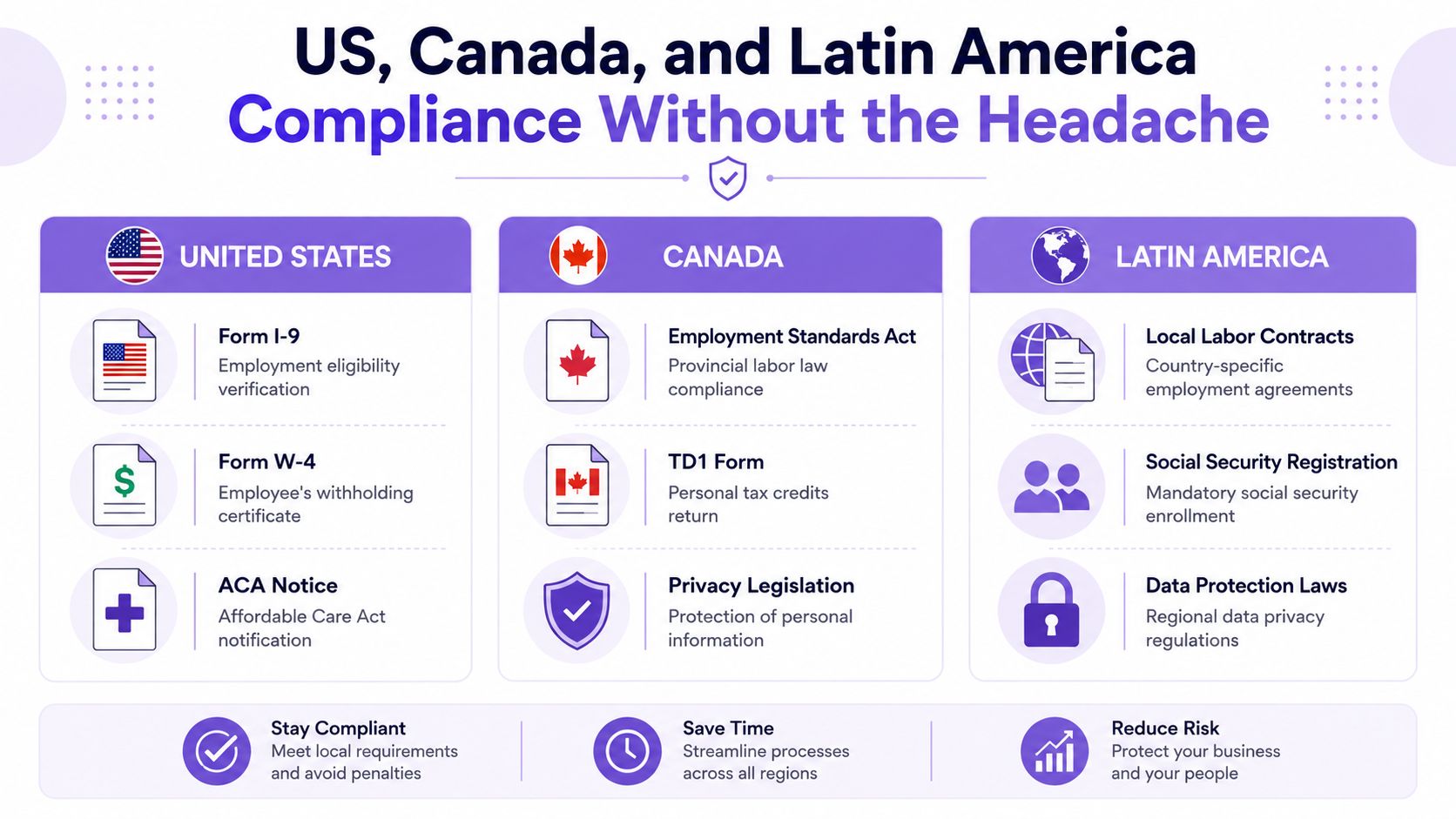
The U.S. core stack is blunt and required. Form I-9 handles identity and work eligibility for every new hire, and Section 2 must be completed within three business days of the employee's start date (U.S. Chamber of Commerce). Employees must present original documents, and those documents fall into List A, List B, and List C categories, which is why “send me an ID” is useless as a hiring instruction (People Managing People).
For payroll, Form W-4 is the federal tax document you need, and Texas's employer guidance includes it in the required new-hire stack alongside the I-9 (Texas Workforce Commission). Some notices are time-sensitive too. Under the ACA, employers must give new hires a Notice of Coverage Options within 14 days of their start date, and California has its own timing rules, including notices at hire and others due within five days or by the end of the first pay period (ADP).
Keep the file clean enough that an auditor, payroll lead, or the person in your chief legal compliance officer role can trace what was collected, when it was collected, and why it belongs there.
Canada is simpler in one sense and more annoying in another. The federal baseline covers part of the picture, but province-specific labor rules, privacy obligations, and tax forms change the onboarding packet you need. If you hire there, stop pretending one national checklist covers every province. It doesn't.
Latin America is where first-timers usually step on rakes. The question is not just whether you can hire there. It is whether you are hiring a contractor, an employee, or using an employer-of-record structure, and what documentation follows from that choice.
That distinction matters because local labor contracts, social security enrollment, and data privacy obligations vary by country, and the record has to show the business reason for the structure you chose. Cross-border files get cleaner when you write down status, payment setup, and the local disclosures tied to the hire instead of letting payroll and legal improvise after the fact.
Bottom line: if location, overlap hours, or payroll setup are real requirements, write down why they are job-related. Do not let them look like hidden filters.
This level of detail usually needs the same discipline you would expect in a employment compliance documentation overview, because a cross-border file that holds up later is built from records, not memory.
Take a remote senior UX designer in Colombia hired by a 15-person U.S. startup. The thin file is depressingly common, and it looks polished right up until someone asks a hard question.
The thin version has a signed offer letter in Drive, a Google Doc with interview notes, and a contractor agreement saved as a PDF. That sounds fine until the dispute arrives. Then you can't show the decision criteria, you can't explain why the location and overlap-hour requirement were job-related, and you don't have the supporting tax, right-to-work, or local disclosure trail.
The difference is not aesthetics. It's whether the file can survive a contractor dispute, an IRS question, or a manager who suddenly remembers the process differently. The defensible file proves the company acted consistently and on job-related grounds. The thin file just proves somebody once clicked “sign.”
You don't need literary genius here. You need usable language that keeps people from freelancing their own process. Copy the structure, customize the blanks, and stop relying on “we'll figure it out later.”
Use language like this:
Role summary: Own [function] and deliver [business outcome].
Core criteria: Required skills, experience, location or timezone constraints, and any work-authorization requirement that is job-related.
Decision note: State what success looks like in the first 90 days.
Don't leave blank the location or jurisdiction requirement, because that's where teams smuggle in bias and later regret it.
Keep the questions the same across candidates for the same role. Add four buckets: skill, judgment, collaboration, and role-specific scenario. Score each bucket against a short rubric, not against your mood after the call.
Write down why a candidate got a high or low score while the interview is fresh. If you wait until Friday, you'll be documenting whatever your memory decided to keep.
Use clear, boring, legally useful language.
Offer terms: title, start date, compensation, benefits, equity if applicable, at-will status if applicable, and governing law.
Acceptance line: candidate signs and returns before the start date.
Revision trail: any counterproposal or amended term gets saved with the final version.
Don't leave blank the governing-law clause. That's not a decorative line item.
The checklist should include I-9 Section 1 timing, employer completion of Section 2 within three business days, W-4 capture, handbook acknowledgment, and the time-sensitive ACA notice where required. The point is not to drown people in paper. The point is to create a clean record that shows the basics were handled on time.
For contract language, benefits, and the stuff that trips teams up, this employment contract template library can save you from inventing legal prose during a coffee-fueled panic.
Templates are not a system. A real system has one owner, a retention rule, a review cadence, and a single source of truth. Without those pieces, you just have a cleaner pile of loose files.
Start by naming one person who owns the file, even if recruiting, legal, and payroll all touch it. Then lock in a retention schedule and run a quarterly audit. That audit needs to catch missing offers, unsigned acknowledgments, expired work-authorization records, and any hire where the paperwork no longer matches the story people are telling about the role.
AI-assisted screening makes documentation more important, not less. If a tool is helping with matching or screening, document the tool, the version, input data, output, configuration, updates, and the latest fairness audit results. If you cannot reproduce how a decision was reached, you cannot defend it cleanly.
Recruiting automation can help if you treat it as recordkeeping, not just speed. If you are standardizing repetitive handoffs without losing the trail, recruiting automation for large enterprises is worth a look. Use the automation to create a paper trail that survives a contractor dispute, an IRS inquiry, or a remote hire that goes sideways.
Treat LatAm-to-North-America files with extra discipline. Cross-border hiring creates more room for missing contracts, mismatched work-authorization records, and scattered local forms, so keep every jurisdiction-specific document in the same file structure and make the audit trail easy to follow. That matters when the file has to answer a hard question without someone on the team explaining it live.
The goal is boring consistency. Boring survives audits, disputes, and the familiar line that someone else thought it was handled.
Start with the file you have, not the one you wish existed. Inventory every current hire, plug the obvious gaps around I-9, W-4, and right-to-work records, then standardize the scorecard so decisions stop living in people's heads. Move everything into one source of truth, and set a quarterly review before you forget and pretend later was a strategy.
The founder from the opening doesn't need a miracle. They need a checklist, a folder cleanup, and the discipline to stop treating onboarding like a scavenger hunt. Do that this week, and the next audit, dispute, or cross-border hire won't feel like a five-figure surprise.
If your hiring files are a little too dependent on heroics, fix them now. Pull one recent hire, audit the paperwork against the record trail, and rebuild the system before the next contractor dispute or compliance question lands in your inbox.