
You're probably living this already. One Slack workspace is buzzing while another is asleep, the onboarding doc is half in English and half in whatever your last manager called “good enough,” and somebody just forwarded a payroll invoice you're supposed to approve without quite understanding what you're signing. That's not “remote work.” That's a system with loose bolts, and loose bolts love to show up at 4:57 p.m.
Collaboration across borders is not a culture problem with a motivational poster solution. It's an operating system problem. The legal layer has to match the payroll layer, the data rules have to match the tooling, and the communication rhythm has to match the time zones. If one of those pieces is sloppy, the whole thing turns into expensive confusion with a nice LinkedIn announcement attached.
The good news is that this is fixable. The playbook is simple, but it isn't fluffy. Hire for overlap and async skill, onboard like you want the person to stay, run communication as a formal protocol, keep compliance boring, use a deliberately small tool stack, and manage performance by output, not by who talks loudest in meetings. That's the game. Everything else is decorative noise.
The first sign is never dramatic. It's a Tuesday morning with three Slack workspaces open, a payroll question you can't answer, and a manager in another time zone asking why the new hire “isn't fully ramped.” You know the person is smart. You also know the process around them is a patchwork quilt held together by optimism and caffeine.
That's where many get collaboration across borders wrong. They treat it like remote work plus translation. It isn't. It's a stack of interdependent layers, legal status, payroll, time zones, culture, tooling, and information flow, and every layer affects the others. Get payroll wrong, and trust drops. Get communication wrong, and work stalls. Get compliance wrong, and you've built a lovely disaster.
The scale of this shift isn't a vibe, it's visible in the data. The OECD reports that the share of publications with an international co-author rose from about 7% in 1985 to about 22% in 2007, and NSF and NCSES data put the global rate of international collaboration at 23% in 2022, up from 19% in 2012. They also show researchers in the United States collaborating internationally on 40% of their articles in 2022, with the United Kingdom at 67%, Australia at 63%, France at 60%, and Canada at 60% OECD publication on international co-authorship trends. That's not a niche behavior. It's the default for serious knowledge work.
Practical rule: if you're still managing cross-border hiring like an email thread with a contract attached, you're already behind.
What you need is an operating model. Define the role, match the time zone, standardize communication, choose the right employment structure, and only then worry about the nice-to-have stuff like culture decks and team GIFs. The rest of this article is the exact playbook I'd use if I had to build the team again from scratch, minus the scars I'd rather not pay for twice.
Start with the job description, because bad recruiting usually begins with lazy writing. If you paste a generic JD into the internet and hope it attracts “great talent,” you're basically asking for mismatched expectations and a pile of polite disappointment. Write for time-zone overlap, English fluency, and async communication first, because those are operational requirements, not soft skills.
A strong JD says what success looks like in plain language. It should spell out core hours, the level of independent judgment required, and whether the person needs to write clearly enough that a manager can wake up to a decision instead of a question mark. If the role can't survive without constant real-time supervision, don't pretend it's a cross-border role. Be honest and save everybody the theater.
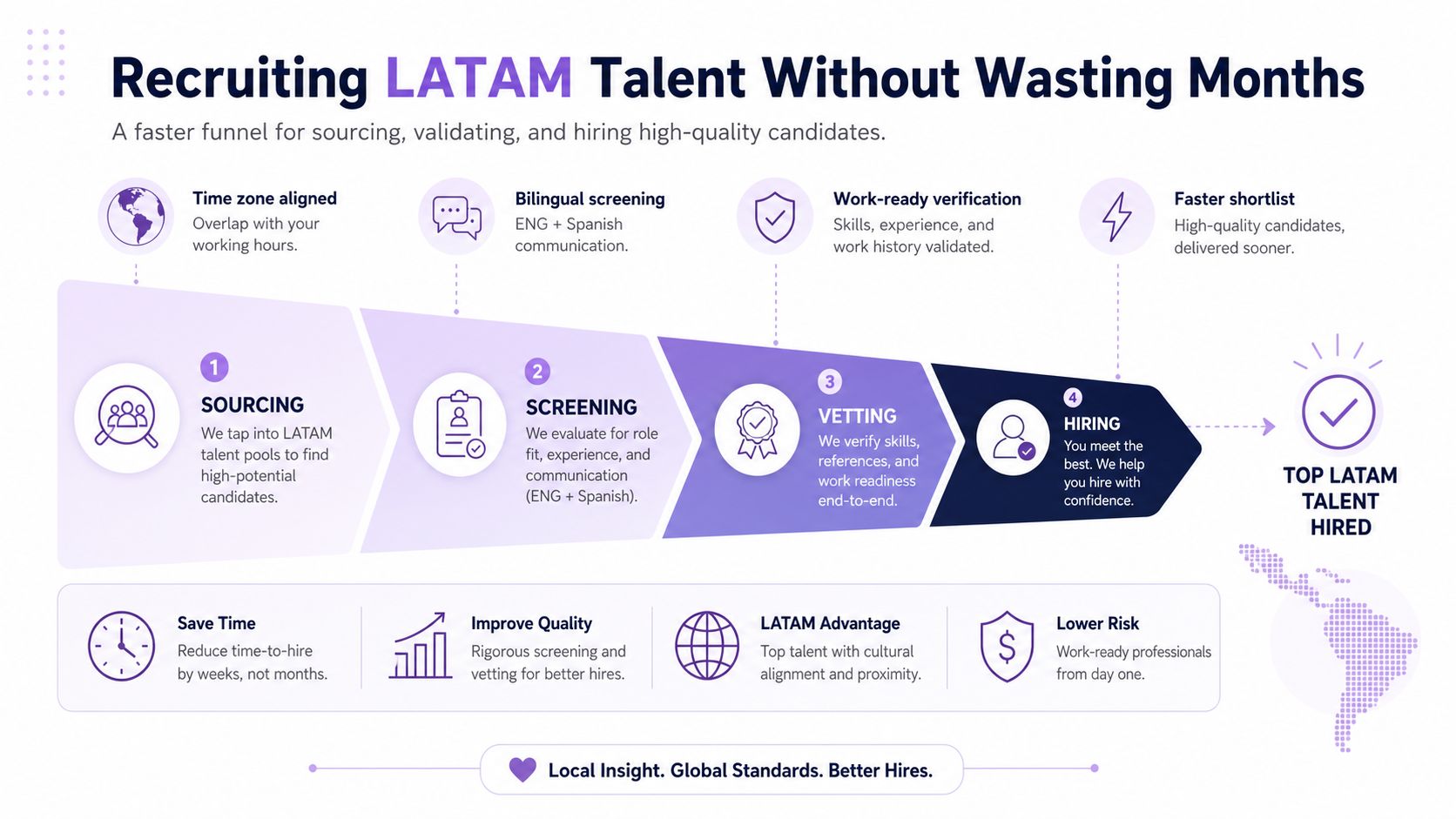
Sourcing should be boringly deliberate. Referrals still matter, niche platforms still matter, and structured matching beats endless inbox triage. LatHire's platform connects companies with a curated talent pool of more than 800,000 pre-vetted Latin American candidates and can match qualified candidates in as fast as 24 hours, which is useful when you're not in the mood to spend three weeks reading résumés that all say “proactive” like it's a personality trait.
Here's the funnel I'd run:
If you want a deeper way to structure that first skills screen, use the pre-employment skills testing guide and stop pretending intuition is a hiring strategy. It isn't. It's a coin flip with good branding.
A simple go, no-go standard helps a lot. If someone is technically sharp but can't write a crisp update, that's a no-go for a distributed team. If they communicate well but can't execute without hand-holding, that's a no-go too. You need both. The whole point is to reduce future firefighting, not hire a new one.
Onboarding fails when teams confuse shipping a laptop with creating clarity. The package lands, the welcome note sounds warm, and then the new hire spends the next ten days trying to figure out where the truth lives. Shipping a laptop without clarity is a scavenger hunt with payroll attached.
Treat the first 30 days like a protocol. Before day one, send the paperwork, the org chart, the tooling list, the main docs, and one short message that says who owns what. Assign a buddy who handles the dumb questions, because dumb questions are how you prevent expensive ones later. If you skip this, the new hire will build their own map, and it will be wrong in ways you won't catch until week four.
Give the first week to context and shadowing. Let them sit in on a few calls, walk through the product, and capture the recurring decisions that keep the team moving. Then hand them a paid starter project with one measurable deliverable. If they can't complete a bounded task with a clear definition of done, the issue is role design, not onboarding.
Keep this rule close: if the team can't explain what a new hire should know by the end of week two, the onboarding plan is still a draft.
By day 30, run a real retro. Ask three blunt questions. What was confusing? What was missing? What should have been documented but wasn't? You'll find out fast where the organization is pretending to be organized. That is useful information, even when it stings a little.
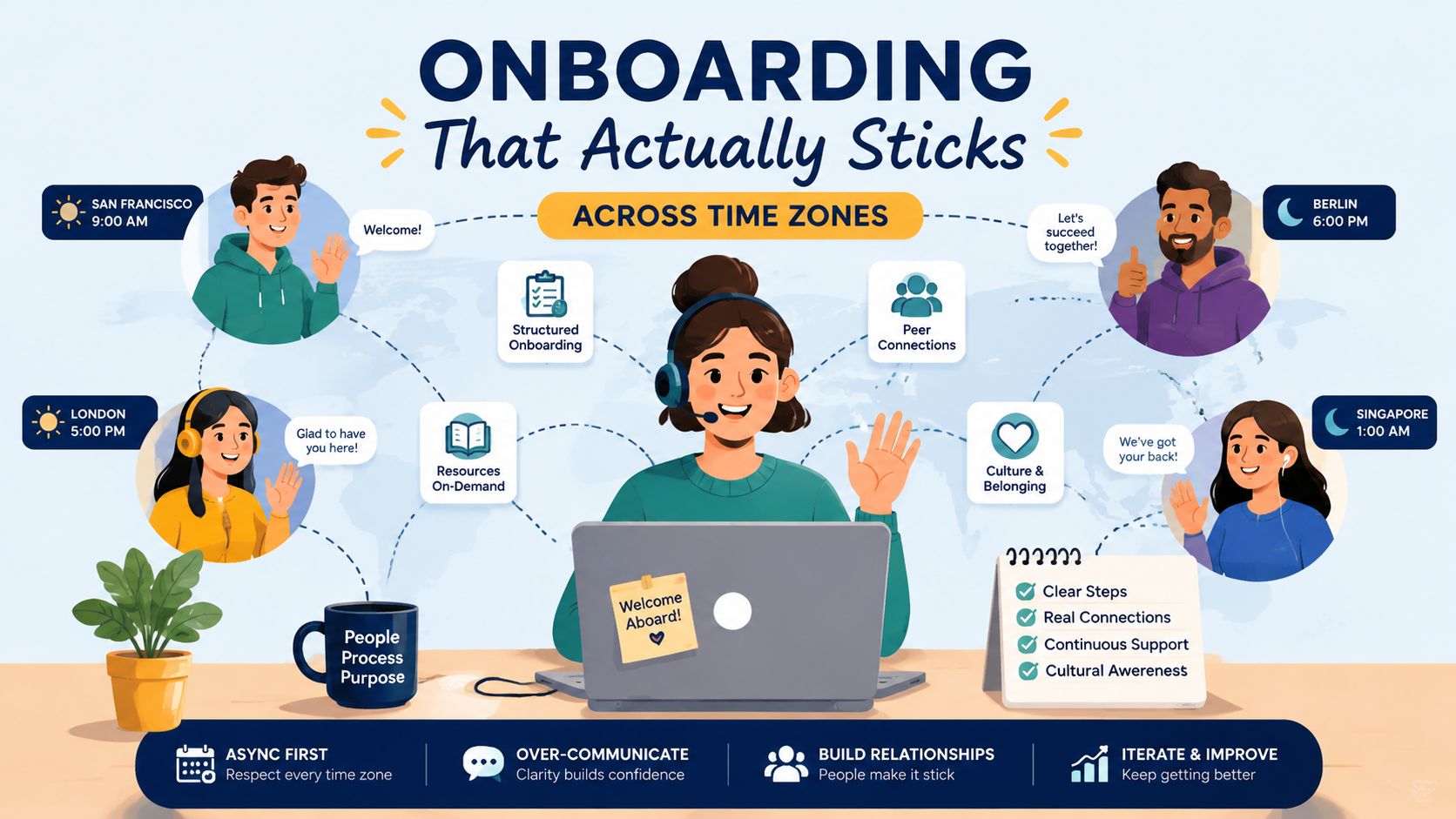
The artifacts matter more than people think. Record walkthroughs. Keep shared docs updated. Use an async standup format that answers what changed, what's blocked, and what needs a decision. Hallway conversation is a luxury distributed teams do not have, so you build its replacement on purpose. For the time-zone side of the setup, the time zone coordination playbook gives you a clean way to decide who overlaps, who asyncs, and who owns handoffs. If that sounds tedious, good. Tedium is cheaper than churn.
A team spread across time zones needs an operating system, not optimism. If half the company is asleep, work still has to move. The failure usually shows up as confusion about ownership, waiting for answers, and meetings that exist only because nobody wrote the decision down.
Choose an overlap model and stick to it. Full overlap fits roles that depend on constant real-time coordination. Partial core hours works for most startup teams, because a few shared hours handle decisions while the rest of the work runs async. Follow-the-sun makes sense when handoffs are the product, like support, operations, or incident response, but it only works if every handoff is written clearly enough for the next person to act without guessing.
For the mechanics, the asynchronous communication guide is worth using because it treats async as a working discipline, not a slogan.
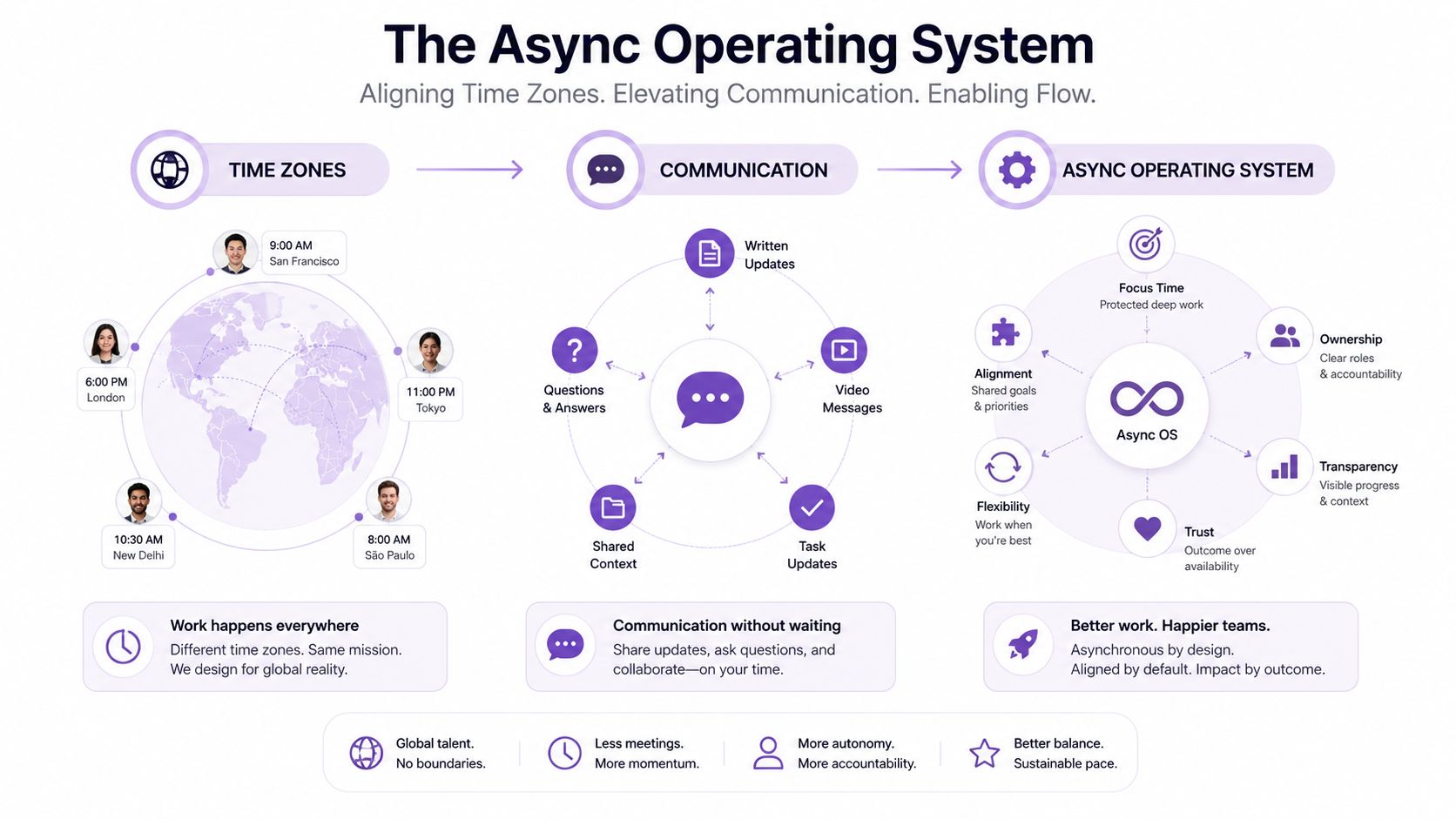
The operating pattern I recommend is plain:
A Loom is for showing work. A doc is for deciding it. Use a call only when the issue needs back-and-forth judgment. If you need clarity and permanence, write it down. If you mix those up, you get meeting inflation and a team that spends its time recovering context instead of shipping work.
Complaining about time zones usually means the team has never decided how work should move when half the company is asleep, which is a management problem wearing a jet lag costume. The fix is to design for overlap on purpose, and the role of time zones in remote work gives a clean frame for deciding who overlaps, who works async, and who owns handoffs. My rule set is simple. Ban decision-by-Slack. Ban “quick calls” that should have been docs. Ban status meetings that exist because nobody keeps records. If a decision cannot be found later, it was never really made.
You have three ways to do cross-border hiring badly. You can build your own local entity and spend your life learning tax registration, mandatory benefits, and employment law. You can use contractor agreements and hope classification doesn't come back with a chair. Or you can use an EOR or platform that bundles the administrative mess into something a human being can operate.
For most US and Canadian companies under 50 people, the default should be simple. Don't reinvent HR across jurisdictions unless you have a real reason and a legal team that likes pain. Use a structure that keeps employment, payroll, benefits, and compliance aligned from the start. That's less glamorous than DIY heroics, but it's also less likely to explode at quarter end.
The hard part isn't just the paperwork. It's the hidden interoperability gap between legal, regulatory, data, and digital systems. Privacy rules differ, procurement norms differ, reporting methods differ, and those differences get expensive fast if you ignore them. That's why I favor standardization up front, shared data definitions, mandatory privacy and ethics rules, and agreed workflows before scale. Flexibility is nice in theory. In practice, sloppy flexibility is where compliance goes to die.
If you want the operational burden moved off your desk, LatHire offers full-service support covering HR, international payroll, benefits, and legal compliance, and reports that its model cuts hiring costs by up to 80% while reducing time-to-hire by over 80%. That's the kind of admin offload that matters when you'd rather spend your week shipping product than becoming a part-time payroll archaeologist. Their what is employer of record overview is the cleanest explanation of the model.
Practical rule: never sign an employment agreement, contractor agreement, or IP assignment template for another country without legal review. The cheap shortcut is usually the expensive one.
For payment mechanics, keep an eye on fees and transfer friction too. The bank transfer fee guide from NomadCards is helpful context when you're trying to understand why “just pay them directly” can turn into death by a thousand cuts. Compliance checklist, in plain English, should include local tax setup, mandatory benefits, worker classification, data privacy handling, and IP assignment that holds up.
Nine teams in ten buy too many tools because software feels like progress. It feels productive, but half the time tool sprawl is just indecision with a credit card. Cross-border teams are especially vulnerable because every new app promises to solve the exact friction they have not named yet.
I keep the stack small on purpose. One tool for communication, one for project management, one for docs, one for video, one for time tracking, and one for security. If two tools do the same job, the team will pick the one that was easiest to install, not the one that creates clarity. That is how you end up with five places to check for truth and zero places to find it.
Slack stays the default for chat because it is the least-bad common language across distributed teams. It is fast, searchable, and familiar enough that people do not need training just to send a message. I would only switch if a team is so regulated or so client-facing that chat discipline becomes a formal policy problem, which is rare and usually self-inflicted.
The mistake people make with Slack is treating it like the source of record. It is a hallway. Keep it light, keep it current, and move decisions into docs. If you do not, you will spend your afternoons scrolling through archaeology instead of managing work.
Asana is my default because it is easy to standardize across functions without turning every task into a software ritual. It handles dependencies well enough, keeps ownership visible, and does not require a ceremony to update. If the team is very engineering-heavy, Jira can make sense, but only if the group is disciplined enough to deserve it.
For practical comparisons, the project management tools recommended by Madeira Remote can help you sanity-check the field, but I would still keep the stack lean. The point is not to collect apps like novelty mugs. The point is to know who owns what, by when, and what happens if they miss it.
Notion wins because it can be both a wiki and a lightweight operating manual without making people jump through hoops. Confluence is fine in bigger orgs, but I have seen more teams avoid updating it than use it. Google Docs still matters for draft-heavy work, because sometimes the fastest path is just a shared doc with comments and a deadline.
The rule here is brutal and useful. If a process changes twice, it deserves a doc. If a decision affects more than one person, it deserves a record. If nobody can find the doc, it does not count.
Loom is the tool I reach for when explanation beats attendance. It is great for walkthroughs, feedback, and context that does not need a meeting. Live calls are still necessary for conflict, nuance, and high-stakes alignment, but Loom cuts out a lot of “can you jump on a quick call?” nonsense.
I will ditch video entirely when the content is purely textual or when the team keeps using video to avoid writing. That is just laziness with a camera on it. A clear paragraph beats a ten-minute video for most routine updates.
Toggl Track is simple enough that people use it. That matters. The best time tracker is the one that does not become a second job. I use it for service work, utilization clarity, and spotting where teams are losing hours to invisible admin.
I would not force time tracking on every team forever, though. Some functions need it. Others just need output targets and sane planning. Use it where precision matters, not as a control fetish.
1Password is the obvious pick for password management because nobody should be inventing their own shared-login system in 2026. Add Google Workspace for identity and permissions if the team is already in that ecosystem. You want fewer places where access can drift, not more.
The security habit that saves the most trouble is embarrassingly basic. Shared access gets reviewed monthly, offboarding gets done the same day, and sensitive docs never live in personal drives. It is not sexy. It just works.
For performance management, I keep the same bias toward clarity. Set output-based KPIs, run weekly async check-ins, review metrics monthly, and hold a quarterly growth conversation that includes what shipped, what stalled, and what needs more support. High performers need a path forward too, especially when they feel invisible because they are not in the room where leadership decisions happen. If your system only rewards visibility, do not be surprised when the best people get bored.
The failure modes are usually the same, and they're painfully predictable. The trick is not avoiding every mistake. It's catching them early enough that they don't become a month-long cleanup project with a morale hangover.
Missed handoffs show up when one team sleeps while another starts work without context. The fix is a written handoff template with owner, status, blocker, and next action. Payroll surprises show up when nobody checked local requirements before the first invoice. The fix is to centralize compliance and stop treating payroll as a last-minute spreadsheet.
Contractor misclassification usually starts with “we'll sort the paperwork later.” That sentence has caused more expensive meetings than I care to count. Culture shock shows up when feedback norms aren't explained and silence gets misread as agreement. The fix is to document how decisions are made, how pushback works, and what “urgent” means.
Scope creep loves cross-border teams because everyone assumes the other side has bandwidth. It doesn't. Async overload happens when people write everything down but never decide anything. The fix is to separate status updates from decision memos and keep the latter short. Decision-by-Slack is a bad habit disguised as speed, and it creates ghost decisions nobody can audit later.
Quiet attrition is the sneakiest one. The warning sign is a strong person who's always present but never energized. The fix is a real monthly check-in and a quarterly growth conversation that asks what they want next, not just what they finished.
If you only remember one thing, remember this, blocked work is easier to fix than silent confusion.
A simple review template keeps the whole thing honest:
That's the whole game. Catch the wobble early, name it plainly, and fix the system instead of blaming the person. Most cross-border pain isn't mysterious. It's just unmanaged.
If you're hiring across borders and want the admin burden off your plate, start by tightening the operating model, then compare a few hiring and compliance paths with your legal team. If you're ready to move faster, talk to LatHire about a cross-border hiring setup that covers sourcing, payroll, benefits, and compliance so you can focus on the work that grows the business.