
Your remote team probably isn't failing because people are lazy. It's failing because the work is landing in all the wrong places.
You can see the symptoms already. One person answers every “quick question.” Another is always “heads down” but somehow still behind. Deadlines slip, Slack stays noisy, and everyone insists they're slammed. They're probably telling the truth. Busy is cheap. Balanced is hard.
I've watched teams hire great people, buy decent tools, hold smart meetings, and still grind themselves into dust because nobody took workload balancing seriously. In startups and agencies, that's normal. You move fast, say yes too often, and pretend the chaos is temporary. It usually isn't. It becomes the operating model.
A few years back, I had a remote team that looked healthy from the outside. Revenue was moving. Clients were happy enough. Sprint boards looked busy in all the right colors. Toot, toot.
Underneath, it was a mess.
Our best engineer had that haunted Zoom look. The kind where someone says “all good” while clearly surviving on caffeine and resentment. A marketing lead who never missed suddenly dropped a launch handoff. A project manager spent half her week translating chaos between Slack, email, and a task board that was technically “up to date” and practically fiction.
That's how this starts. Not with a dramatic collapse. With drift.
Most remote teams don't have a productivity problem. They have an allocation problem. The wrong people hold too much context, too many approvals, too many invisible tasks, and too many emergency hand grenades.
The visible workload is only half the story. Jira, Asana, ClickUp, Monday.com, Linear. Fine. Useful. But the actual strain lives in the junk around the work. The DMs. The “got 5 mins?” calls. The half-decisions that come back three times. The handoffs nobody designed.
Practical rule: If your team's top performers are also the default help desk, you don't have stars. You have structural debt.
This isn't fluffy HR talk. It's operations. And the cost gets ugly fast. Inadequate workload balancing is a primary driver of the 60.2% average employee burnout rate, and it's why over one in four employees at companies without strong balance plans are looking to leave right now according to work-life balance statistics compiled by 4 Day Week.
That's not a vibe problem. That's a business problem.
In-person teams can sometimes hide imbalance with hallway fixes and social glue. Remote teams can't. Every weak process gets exposed. Every unclear owner becomes a bottleneck. Every “temporary” workaround becomes someone's permanent extra job.
That's why I'm bullish on tools that surface hidden work instead of just showing task lists. If you're trying to spot where communication load and approval drag are crushing output, these AI tools for remote leadership are worth a look.
A remote team rarely breaks all at once. It frays. Subtly. One overloaded person at a time.
Your project tracker is lying. Not maliciously. Just confidently.
It shows official work. It doesn't show the ten interruptions between two real tasks, the meeting that should've been a Loom, or the fact that your designer is doing unpaid therapy for three departments. If you want workload balancing to improve, you need one week of uncomfortable honesty.
Start ugly. Start now.
Use whatever your team already touches. Slack. Google Sheets. Notion. A shared doc. This is not the moment to buy “enterprise workforce intelligence” with twelve dashboards and a tragic onboarding webinar.
For five working days, track these things:
This visual sums it up better than most ops docs do.
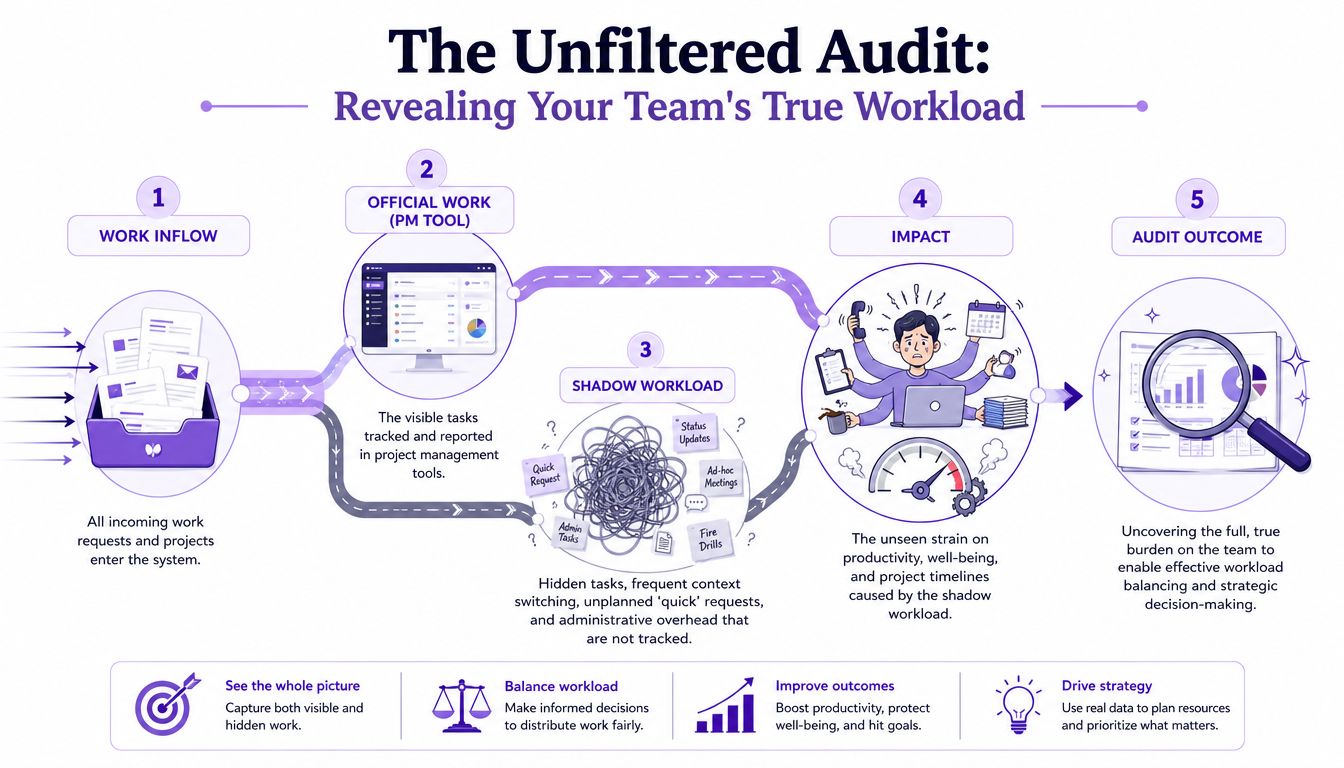
The point isn't precision. The point is exposure.
You're hunting for patterns, not courtroom evidence. A few usually jump out fast:
If a team member has a clean board and a chaotic day, your system is measuring admin theater, not workload.
Many companies stop at this point. They collect the mess, nod solemnly, and then go back to guessing. Don't do that.
A more structured approach works better. Combining assessment and scenario modeling can cut workload imbalances by 24%. Even better, AI-powered scheduling engines boost project success rates from 63% with manual allocation to 87% according to Saviom's workload balancing guide.
That sounds fancy. In practice, it means asking blunt questions. What happens if this account manager stops being the human router? What slips if approvals move to async? What breaks if one senior reviewer goes offline for two days?
Don't just map workload. Map capability. Some imbalance is really a skills mismatch wearing a fake mustache. If you need a practical way to expose that, run a skill gap analysis before you start reassigning work blindly.
You don't need a perfect audit. You need one honest enough to kill the illusion that your current workload distribution is “mostly fine.”
It usually isn't.
Most prioritization frameworks are great. In slide decks.
In real startup life, they fall apart the second a client changes scope, sales promises something weird, and your lead engineer vanishes into an auth bug from 2019. Eisenhower. MoSCoW. RICE. Useful thinking tools. Terrible religion.
The mistake is assuming prioritization is about ranking everything. It isn't. It's about refusing things on purpose.
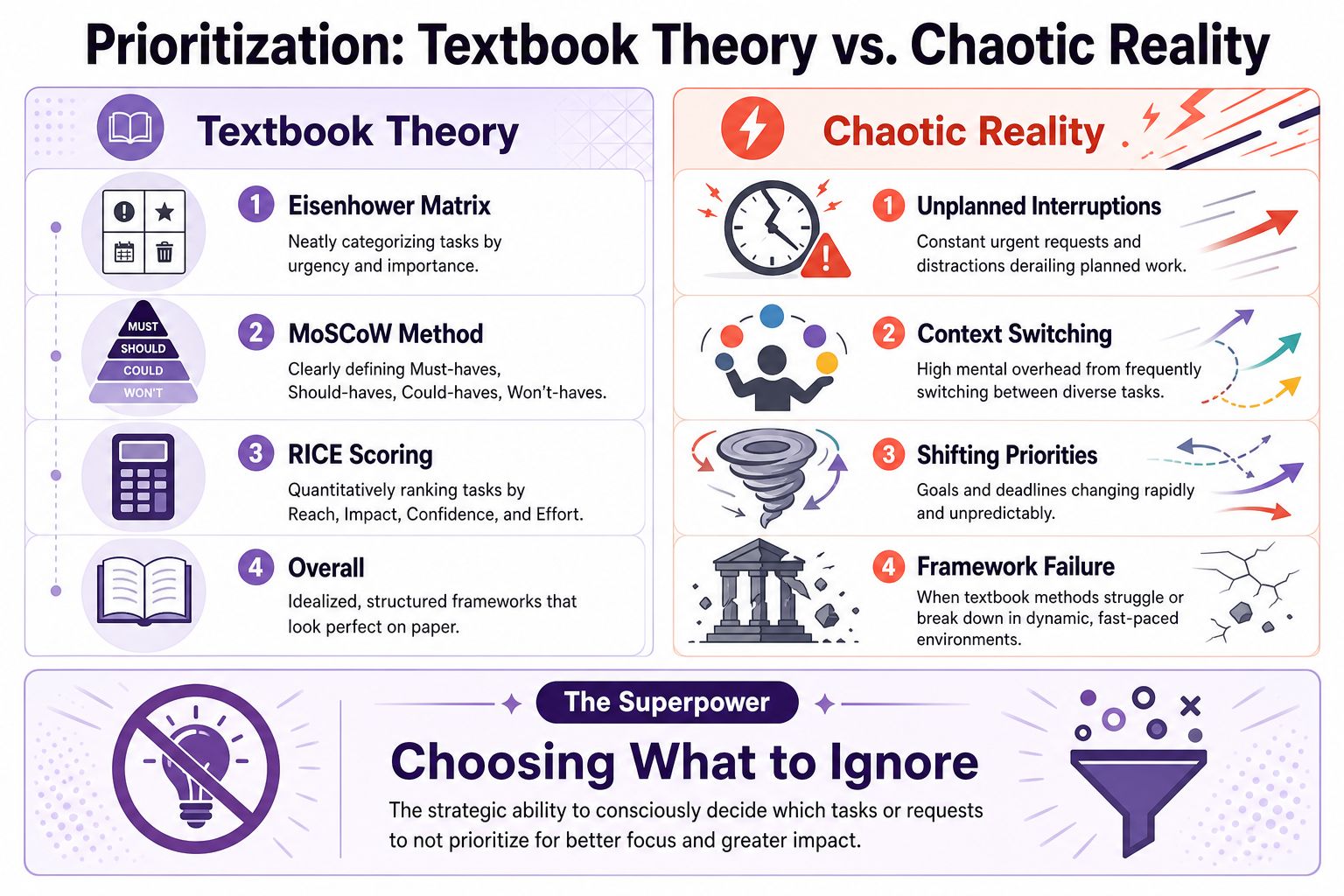
Eisenhower assumes people can calmly sort urgent from important. Cute. In agency and startup land, everything arrives wearing an urgent hat.
RICE assumes you can estimate impact with a straight face. Sometimes you can. Sometimes you're guessing with a spreadsheet and a prayer.
MoSCoW is the most practical of the bunch, but teams still cheat. Everything becomes a Must. That's not prioritization. That's panic with better branding.
Here's the reality. Workload balancing gets easier when your team shares a language for what gets ignored.
I prefer four buckets. Not because they're elegant. Because they survive contact with chaos.
| Bucket | What it actually means | What to do |
|---|---|---|
| Firefighting | Production issues, true blockers, client-facing failures | Handle fast, then ask why it existed |
| Real work | Revenue, delivery, product, hiring, retention work that moves the company | Protect time for it |
| Shiny objects | New ideas, side quests, “quick experiments,” internal pet projects | Park it unless it earns a slot |
| Polite nos | Requests that feel socially awkward to decline but don't matter enough | Decline clearly and quickly |
That last bucket matters more than people think.
The healthiest teams I've run weren't the fastest. They were the ones that got comfortable saying, “Not now,” without writing a novella to justify it.
I still use MoSCoW sometimes. I still ask urgency-versus-impact questions. But I use them as a second pass, not as the operating system itself.
Try this instead:
Teams don't have a capacity problem. They have a courage problem. They won't kill low-value work because somebody important asked nicely.
That's how calendars fill up and momentum dies.
A balanced team doesn't happen because everyone means well. It happens because the rules make imbalance harder to create.
You need an operating system. Not a manifesto. Not a Notion page nobody reads. Actual rules.

Shared ownership sounds collaborative until nobody knows who decides. Then your team burns hours on pings, follow-ups, and “just checking where this is at.”
Use single-threaded ownership for anything important. One person owns the result. Others can contribute. They don't own the thread.
That one move cuts a shocking amount of invisible labor. Fewer status chases. Fewer duplicated reviews. Less diffusion of responsibility.
Stop planning as if every person has a magical full week available for project work. They don't.
People have interviews, support load, admin drag, recurring meetings, timezone gaps, and the occasional need to think like a human. Capacity-based planning means accounting for real availability before you commit to delivery.
A good sanity check is a two-week sprint audit. Measure Task Completion Velocity and Cycle Time. If cycle time, the duration from “To Do” to “Done,” is creeping up for an individual, they're likely swamped, and it's time to use a framework like MoSCoW to Delegate, Delay, or Drop tasks based on BeyondHire's workload management advice.
That beats waiting for someone to implode.
Because it does.
If your team can't get uninterrupted work blocks, all your planning is decorative. Set communication rules that feel almost rude at first:
Field note: “Available” should not mean “interruptible.”
If you need more ideas on structuring people, tools, and allocation around actual output, I like Recepta.ai's resource optimization insights. They're practical, not just consultant wallpaper.
People should know how work gets assigned, when priorities can change, and what happens when capacity is gone. Hidden rules create politics. Visible rules create trust.
A simple version can live in one page:
And yes, software helps. If your stack is still stitched together with Slack pings and crossed fingers, look at remote workforce management software that gives managers one place to see assignments, availability, and handoffs without turning into surveillance weirdos.
Good workload balancing feels boring. That's the compliment.
You fixed the obvious mess. Nice. Now the sneakier problems show up.
These are the ones that make founders say, “But we already have process.” Sure. And I've already owned a treadmill. Didn't make me a runner.
Your highest performer is often the least scalable part of the team.
They're fast, reliable, and annoyingly good at cleaning up everyone else's mess. So what happens? Work gravitates toward them. Reviews go through them. Hard clients go to them. Internal uncertainty goes to them too. Congrats. You just turned your best operator into a choke point.
This gets misread as proof they should own more. Wrong. It's proof your system leans on heroics.
Watch for these signs:
The fix isn't punishing your top performer. It's reducing their review surface area, documenting repeatable decisions, and building stronger second-line owners.
If nobody else can carry the work, the work isn't balanced. It's fragile.
AI doesn't just remove work. It redistributes it. Usually badly at first.
Leaders buy an AI tool expecting speed. Then junior staff get buried reviewing AI-generated drafts, sorting noisy outputs, and cleaning up low-value task volume. Senior people get hit from the other side. They spend more time checking exceptions, handling edge cases, and bouncing between strategy and QA. Everyone stays busy. Nobody feels lighter.
The data backs up the pain. AI adoption can increase junior staff workload by 30–50% because of the volume of AI-generated tasks requiring review, and a 2025 Gartner study found that 72% of managers struggle to rebalance this new type of work as noted in Monday.com's workload management analysis.
That's the part most AI evangelists leave out while posting thread-length victory laps.
AI is not a headcount strategy. It's a workflow redesign project wearing a productivity costume.
Most leaders think they delegate when they really just reassign tasks without authority, context, or decision rights. Then they wonder why the work boomerangs back.
If this is a weak spot on your team, go master effective delegation. Not because delegation is trendy. Because workload balancing dies when leaders keep primary ownership and dump only the admin.
The ugly truth is simple. You can't balance work if all meaningful decisions stay trapped at the top and all repetitive review work floods downward.
If your team thinks workload balancing means spyware, you've already lost.
Nobody does better work because a dashboard tattles on mouse movement. That kind of monitoring creates compliance theater. People optimize for looking active instead of being useful. You get more digital fidgeting, less actual progress.
Track fewer things. Make them matter. Use them to start conversations, not win arguments.
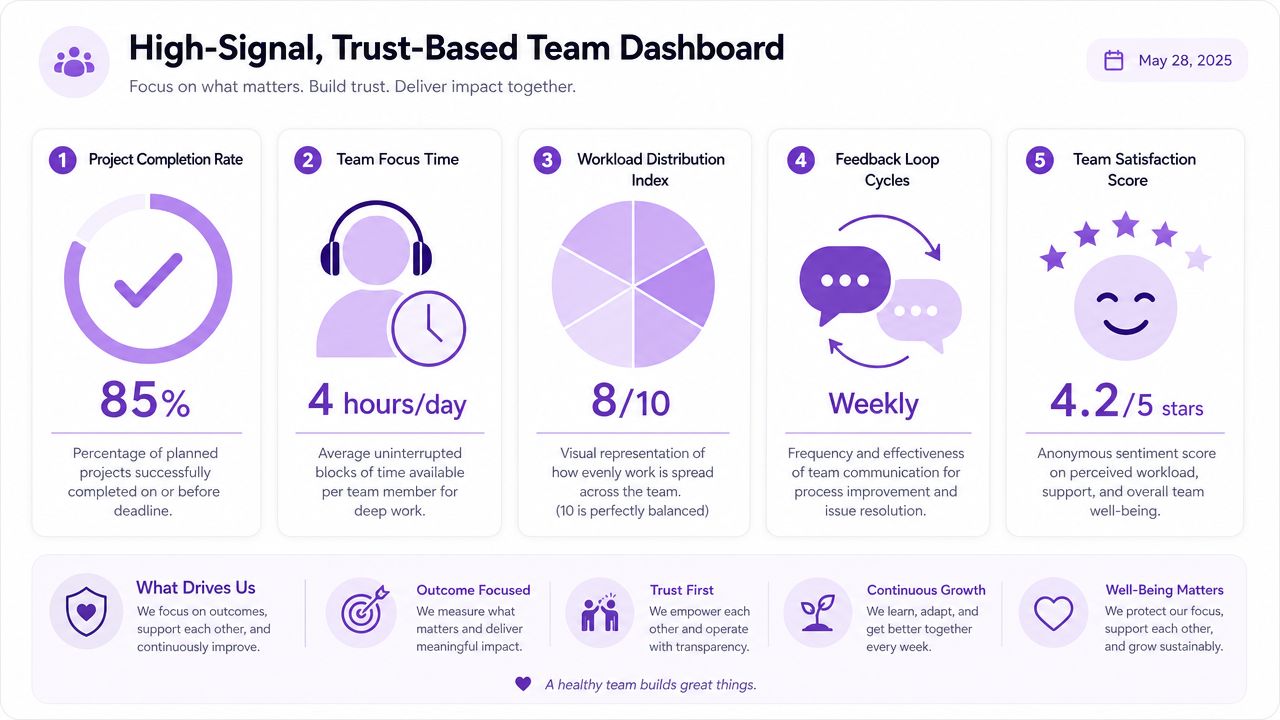
The best weekly dashboard I've used is almost suspiciously simple. Track the “one number that moved 10% or more” across a five-metric dashboard such as billable percentage, focus time, project burn rate, workload distribution, and activity rate. A swing above 10% justifies a conversation about the root cause according to Konark's guidance on workforce analytics for remote teams.
That's it.
Not twenty charts. Not color-coded panic. One notable shift that tells you where to look.
A good dashboard does three things:
Hard data alone lies by omission. A team can hit deadlines while privately hating their lives.
So pair delivery data with lightweight check-ins. Weekly completion trends. Focus-time patterns. Then add tiny pulse surveys. Three to five questions is enough if people believe the answers won't be used against them. Ask how the workload feels. Ask whether priorities were clear. Ask whether people felt safe flagging blockers.
One of the smartest operational habits I've seen is setting clear deviation thresholds for coaching. If actual hours blow past plan, treat it as a manager signal, not an employee gotcha. Reward early flagging. Don't punish it.
Try questions like these in one-on-ones:
| Question | Why it works |
|---|---|
| What felt heavier than it looked on paper this week? | Finds shadow workload |
| What did you finish that shouldn't have belonged to you? | Exposes poor ownership |
| Where did context switching kill momentum? | Surfaces system friction |
| What should we stop doing next week? | Forces prioritization, not just endurance |
You can support this with the right tools, sure. If you're trying to gather enough visibility without crossing into surveillance nonsense, use time tracking for remote employees in a way that emphasizes trends, workload planning, and coaching.
The moment metrics become a weapon, people stop telling you the truth.
That's the whole game. Keep score so the team can work better, not so management can feel powerful.
Workload balancing is not a side project. It's the job. If you don't decide how work gets distributed, urgency will decide for you, and urgency is a terrible manager.
If you're building a remote team and need people who can carry ownership without months of hand-holding, LatHire is worth a look. They connect companies with pre-vetted Latin American talent across tech, marketing, sales, and operations, which makes scaling a lot less chaotic than cobbling together hiring across five job boards and a prayer.